
Someone has asked you to turn a process, a policy or a product into an online course, and the obvious place to start is the material you already have. That is the order almost every guide to creating e-learning follows, and it is the order that produces the forty-minute click-through nobody finishes.
Build it backwards instead. Start from the one thing you want a person to do differently at work, design the practice that makes them better at doing it, and only then decide what information has to be in the course at all. Everything else, the tool, the format, the length, the tracking, follows from that decision rather than driving it.
This is how to run that build, step by step, from the first conversation to the measurement that tells you whether it worked.
Start with the action, not the content
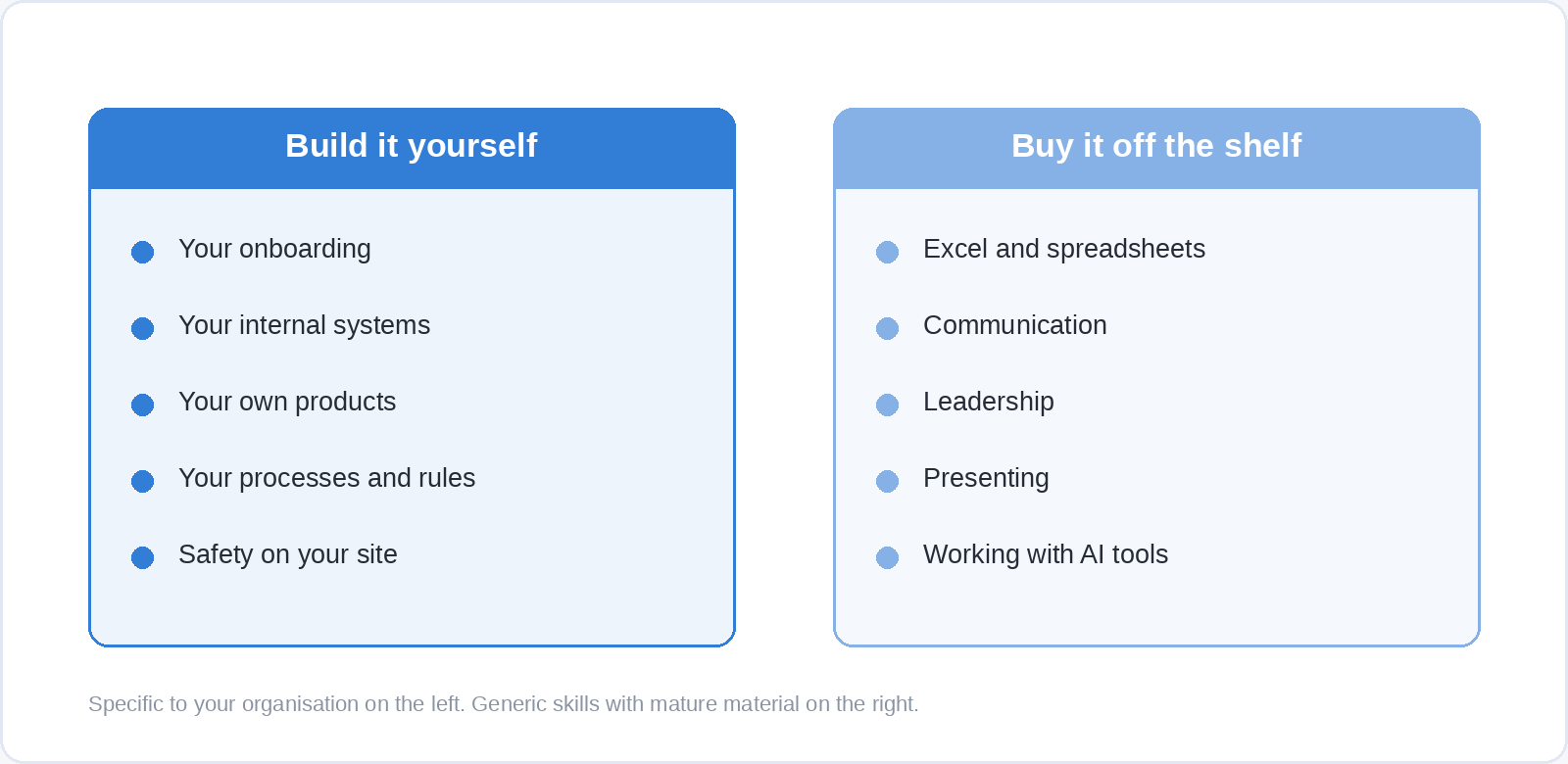
The method that makes this practical is action mapping, developed by instructional designer Cathy Moore. It has four moves: establish a measurable business goal, work out what people have to do differently to reach it, build practice activities that mirror the real decisions those actions involve, and then identify only the information people need to complete those activities.
The order matters more than the labels. When you map a course this way, every piece of content has to earn its place by supporting a specific activity, which is why Moore describes the map’s purpose as preventing “the casual adding of content”. Anything you cannot attach to an action stays out of the course, and most of a typical source document turns out to be exactly that.
Moore’s own account of the method puts another step before the practice design: identify the best solution, which includes working out whether training is the right instrument at all. That is the step most projects skip, and it is the one that saves the most money.
Does this need to be e-learning at all?
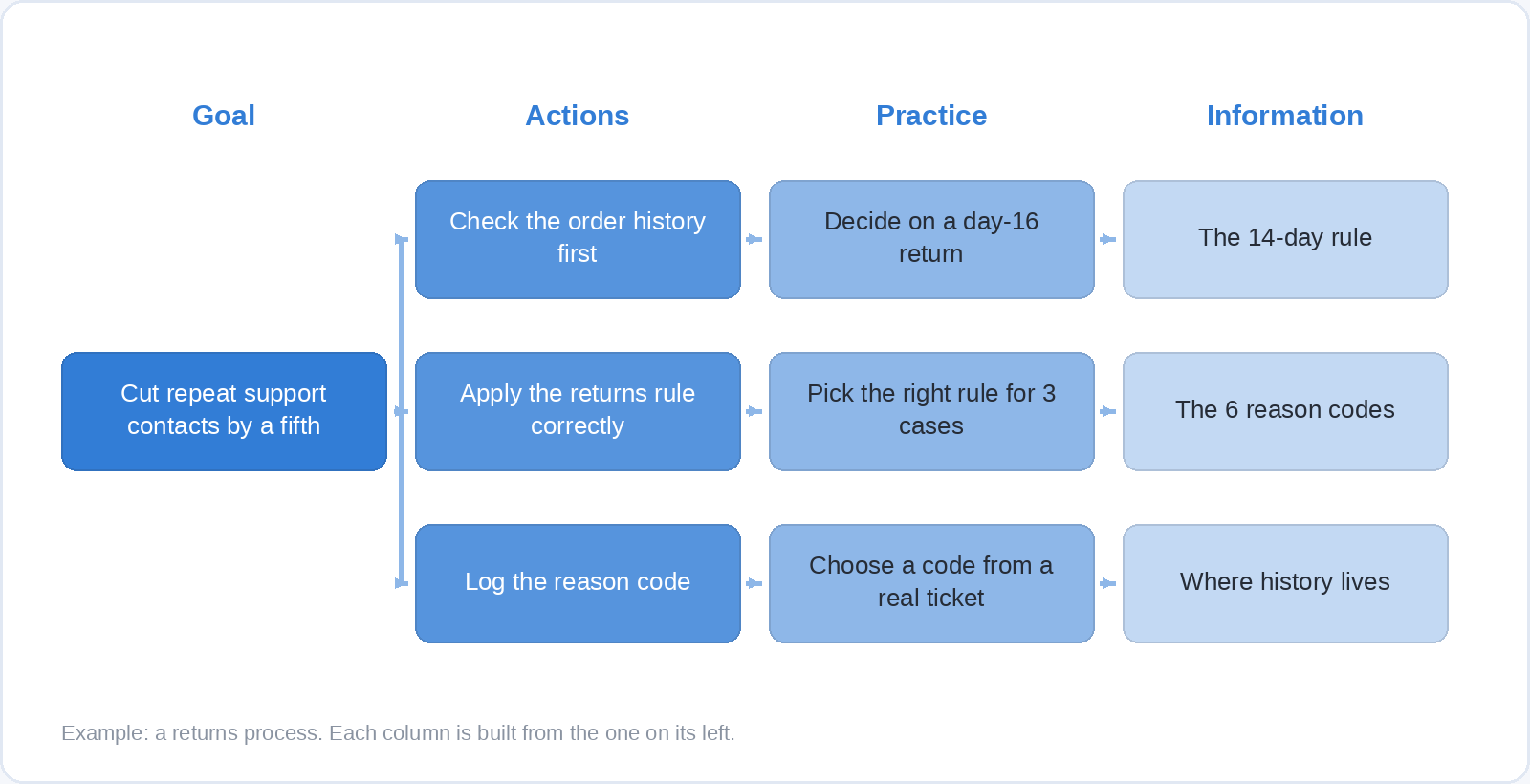
Training fixes one kind of problem: someone does not know how to do the thing, or does not know that they should. If the real reason a task goes wrong is a confusing form, a policy nobody can find, a system that times out, or a manager who rewards speed over accuracy, a course will not fix it and will get blamed for not fixing it six months later.
Ask three questions before you build anything. Could the person do this today if their life depended on it, which separates a skill gap from an environment problem. Is the information they need available at the moment they need it, which is often a job aid rather than a course. And does anything in the way the work is organised actively push against the behaviour you want, because if it does, that is the first thing to change.
Worked through seriously, these three questions kill some projects outright. That is a good outcome, and it buys you the budget and the credibility to build the ones that survive.
Should you build it, or buy it?
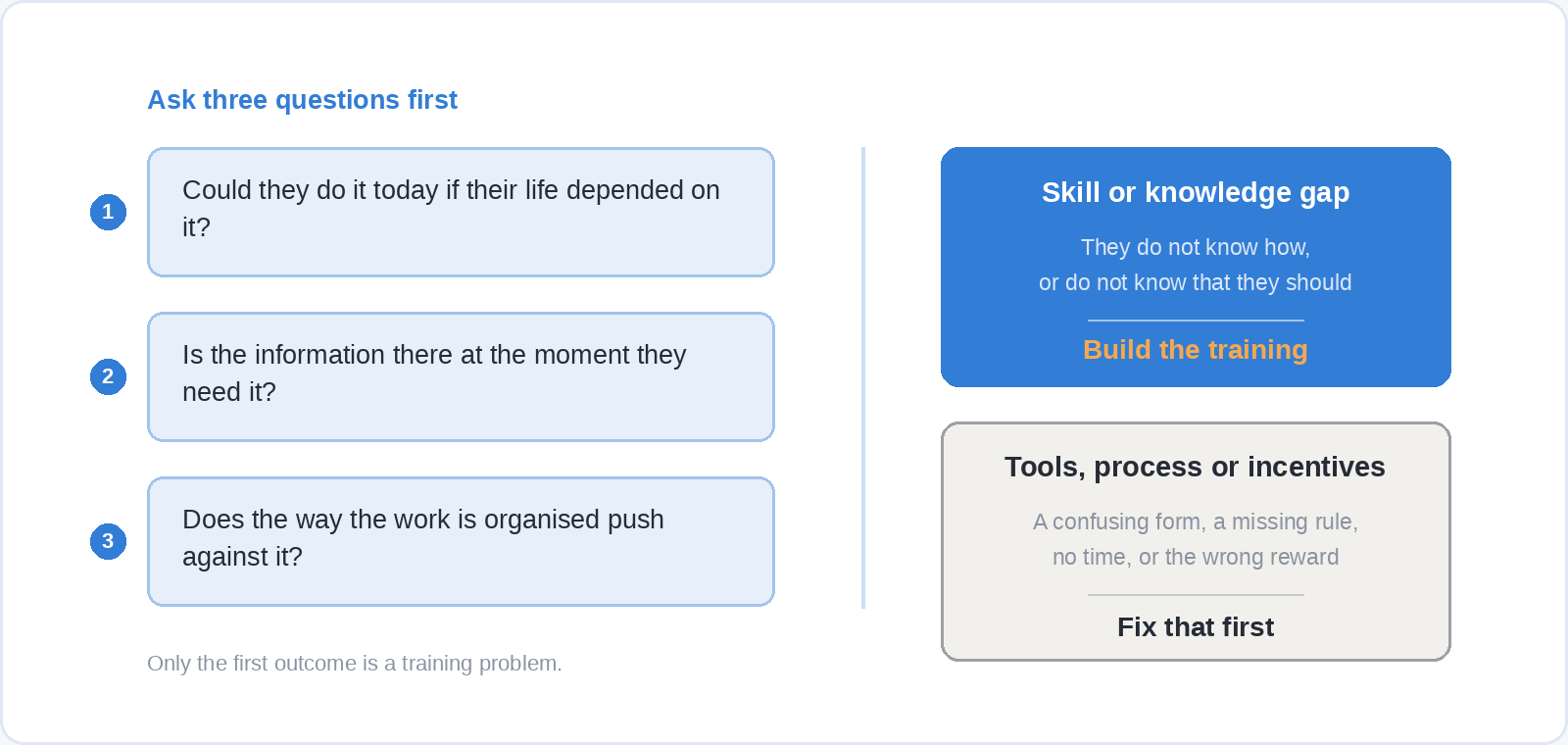
Build what is specific to your organisation and buy what is not. Your onboarding, your internal systems, your products, your processes, the safety rules that apply to your site: nobody else can make those, and they are exactly the courses that make new people productive faster. Excel, communication, leadership, presenting, working with AI tools: those are generic skills with mature material already on the shelf, and building them from scratch means paying to reinvent something you could switch on this afternoon.
The cost of building is rarely the software. It is the hours of the expert who actually knows the process, the review rounds with legal or compliance, and the re-recording you will do every time the system changes screens. A bought course carries its own maintenance, which is someone else’s problem by design.
Most organisations end up doing both, and the practical question becomes whether the two can live in one place. On Soofos for Business you can add your own private company training, onboarding, safety, internal tools, and assign it alongside the 600+ courses in the library, so a new starter gets your induction and their Excel module from the same dashboard rather than from two systems with two logins.
Write the action down before you write anything else
“Understand the returns policy” is not an action. “Process a return within the fourteen-day window without escalating it” is, because someone else can watch it happen and tell whether it did.
The test is simple: if you cannot picture a specific person doing the thing at a specific moment, you cannot design practice for it, and you will not be able to measure it later either. Vague objectives are where courses go to become slide decks, and they are usually a sign that the goal underneath has not been agreed with whoever asked for the training.
Write one action per module. If your list has eleven actions on it, you have a programme rather than a course, and the order you release them in becomes a design decision worth making deliberately.
Design the practice before you write the content
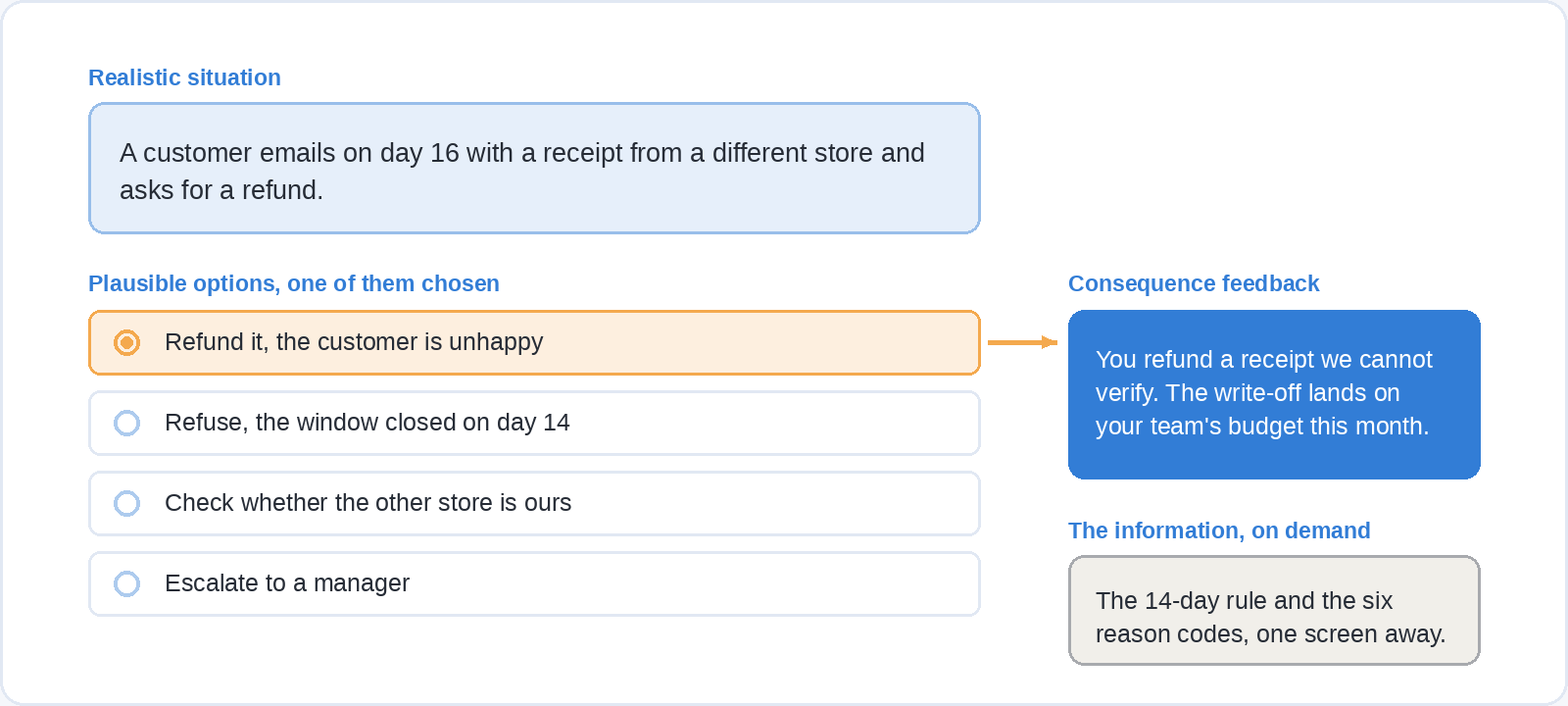
A practice activity is a decision the learner actually faces at work, presented with the same ambiguity it has in real life. A customer emails on day sixteen with a receipt from a different store, and the returns window closed two days ago. The options are all plausible, because in the real situation they are, and the feedback shows the consequence rather than announcing a verdict.
Write those activities first, while the course is still an outline. Then go back and write only what a person needs to make each decision well. Done in this order, a forty-slide source document routinely collapses into six screens and four scenarios, and the course gets shorter every time you look at it rather than longer.
The temptation is to explain everything first and test at the end, which feels thorough and is the opposite of what the evidence on retention supports.
Why the questions are the learning, not the checkpoint
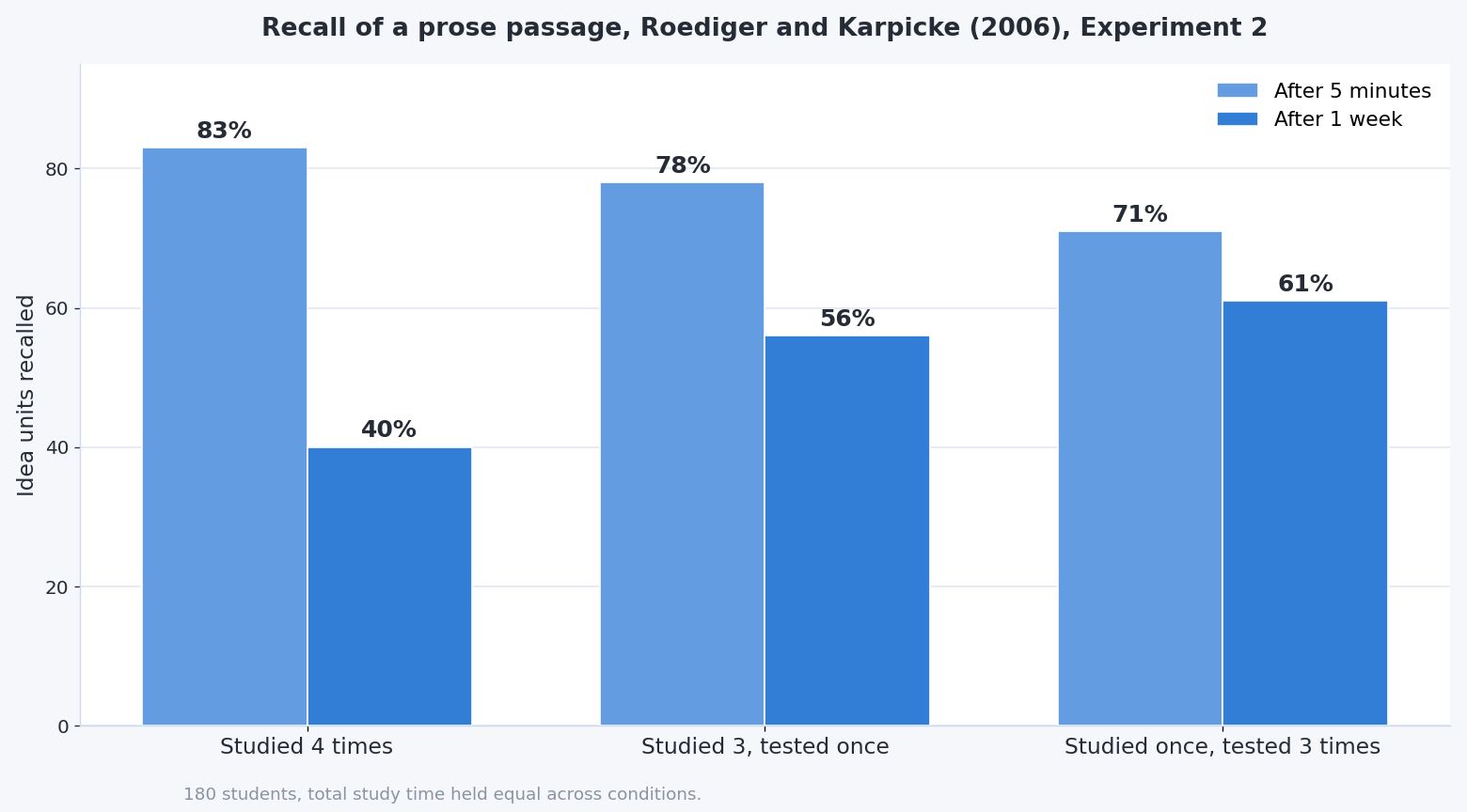
Roediger and Karpicke tested this directly in 2006. In their second experiment, 180 university students read prose passages and then either studied them repeatedly or were tested on them, with the total time held equal.
Five minutes later, rereading looked better: the group that studied four times recalled 83% of the material, and the group that was tested three times recalled 71%. A week later the result reversed. The tested group recalled 61%, while the group that had only reread dropped to 40%.
That is the whole argument for putting retrieval throughout a module instead of saving it for a final quiz. Every question a learner answers from memory is doing the work that another screen of explanation only appears to do. It is also why a single course event is a weak instrument on its own, and why spacing the practice across weeks beats concentrating it in one sitting, which is covered in more detail in our piece on how to learn easier.
How long should a module be?
One action, one module, and short enough that someone can finish it between two meetings. Ten minutes is a reasonable ceiling for a workplace module and five is better, because the alternative to a short module is not a long module, it is an abandoned one.
Video inside the module wants to be shorter still. The research on video length and engagement, and what it means for how you record, is set out in our guide to creating a free online course, and it applies the same way to internal training.
How much you explain before the first activity depends on who is taking it. Guidance that helps a complete beginner starts to slow an experienced person down, which is a well-documented effect rather than a matter of taste, and we cover when to lead with instruction and when to get out of the way in learning theories: when each one works.
Which authoring tool should you use?
The tool is one of the cheapest decisions in the project and the one teams spend longest on. Pick something that exports to the standard your platform reads, and spend the saved time on the scenarios.
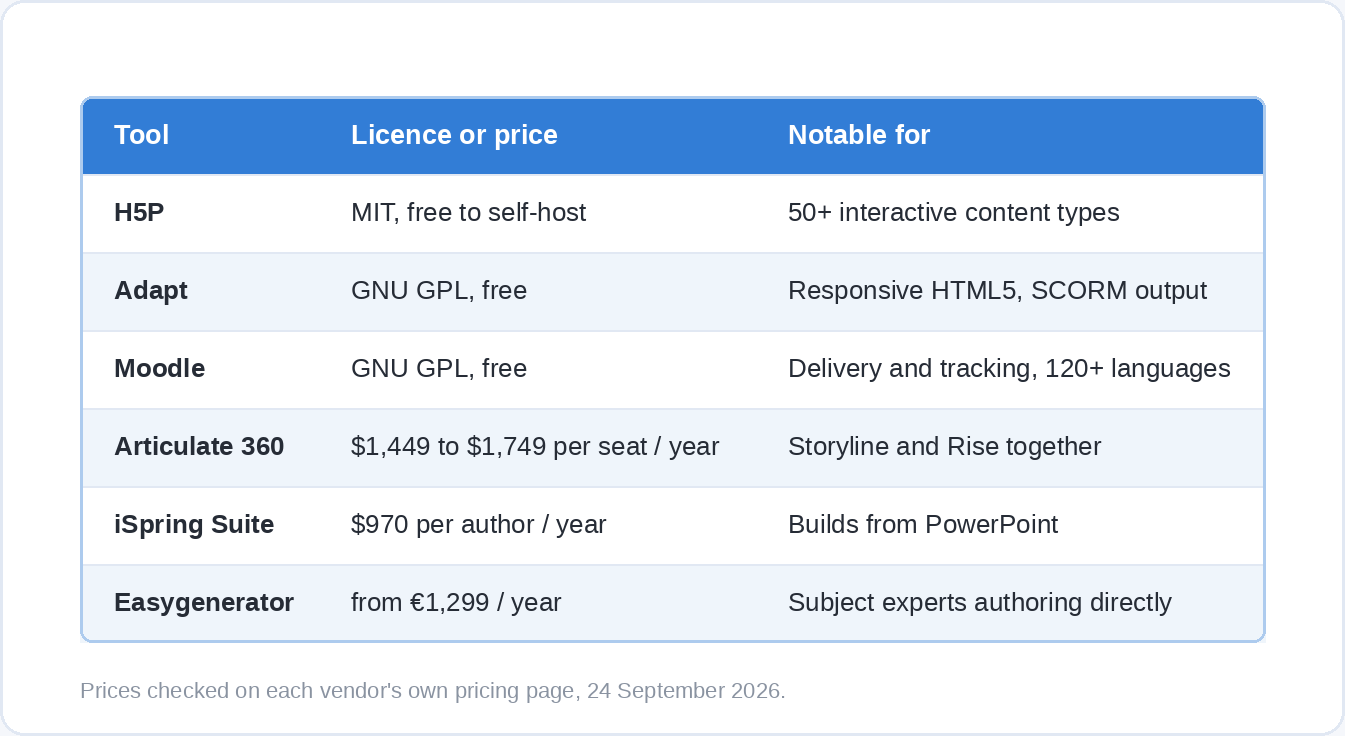
Free and open source covers more ground than most people expect. H5P is released under the MIT licence and gives you interactive content types you can self-host inside Moodle, WordPress or Drupal, with a hosted version at h5p.com if you would rather not run it yourself. Adapt is published under the GNU General Public License and produces responsive HTML5 courses that run in a SCORM-compliant platform or standalone. Moodle itself is GPL-licensed and free to install, with WCAG 2.1 Level AA accreditation and translations in more than 120 languages.
Among the paid tools, Articulate 360 runs $1,449 per seat per year on its personal plan and $1,749 on teams, and includes both Storyline for custom interactions and Rise for responsive courses that assemble quickly. iSpring Suite is $970 per author per year and works as a PowerPoint add-in, which suits organisations whose source material already lives in slides. Easygenerator starts at €1,299 a year for one author, ten courses and a hundred learners, with a team plan from €6,495. All of them offer a trial, and all prices here were checked on the vendors’ own pricing pages on 24 September 2026.
SCORM, xAPI and cmi5: how the course talks to your platform
Your course has to report back to whatever system tracks it, and there are three standards in play. Ask your platform which ones it accepts before you build, because retrofitting is tedious and avoidable.
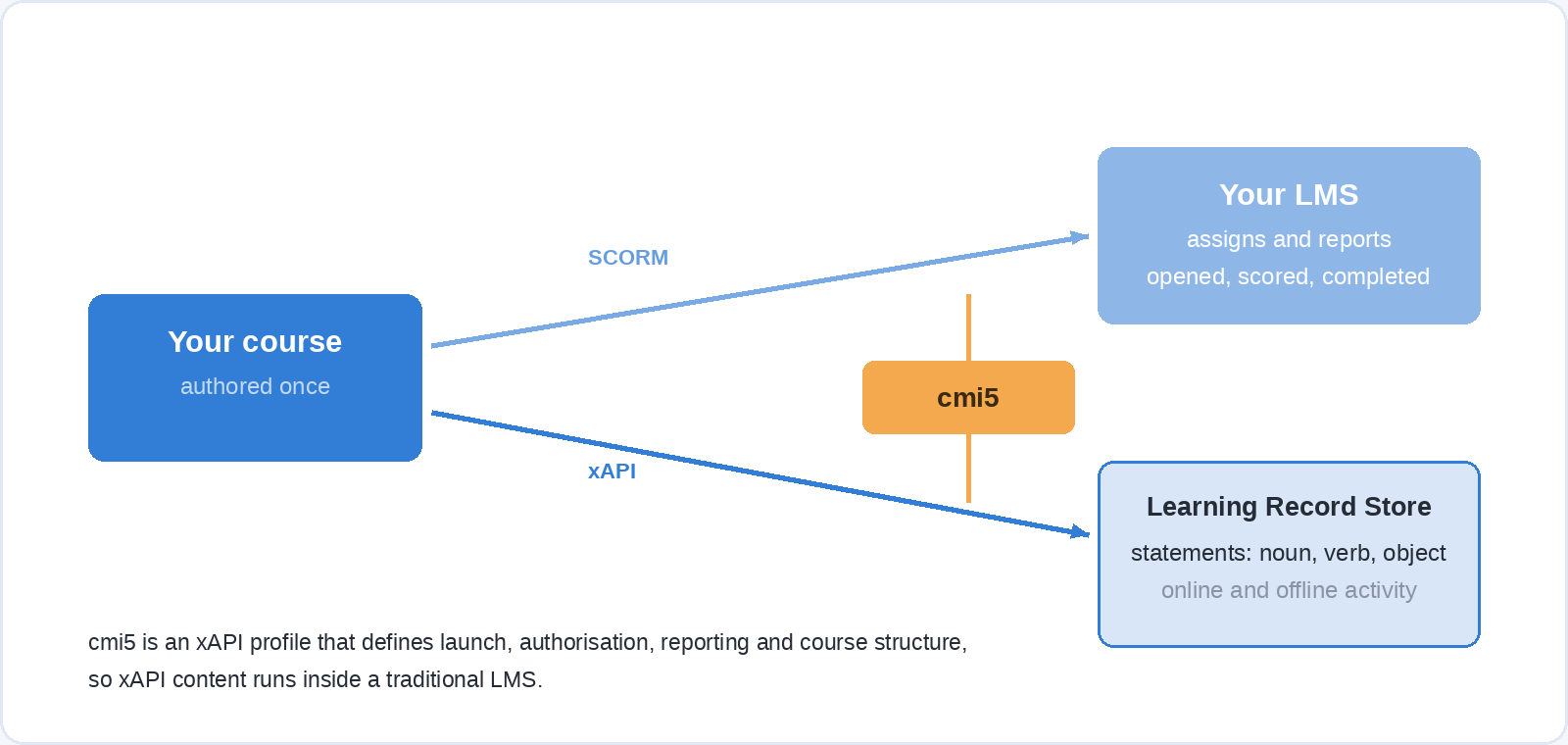
SCORM is the old packaging format, and its virtue is that essentially every learning platform reads it. It tracks a course as a single unit: opened, progressed, completed, scored.
xAPI is the modern replacement, an IEEE-approved standard (IEEE 9274.1.1-2023) that records individual experiences as statements in the form “noun, verb, object”, sent to a Learning Record Store. Because the statements do not depend on a browser session, xAPI can capture things SCORM never could, including offline activity, simulations and events that happen outside the course entirely.
cmi5 is the bridge between the two. It is an xAPI profile that defines launch, authorisation, reporting and course structure, so xAPI content behaves properly inside a traditional LMS. The shorthand on the standard’s own site is “cmi5 = xAPI + LMS”, and if your platform supports it, it is usually the right target for new material.
Make it usable for everyone
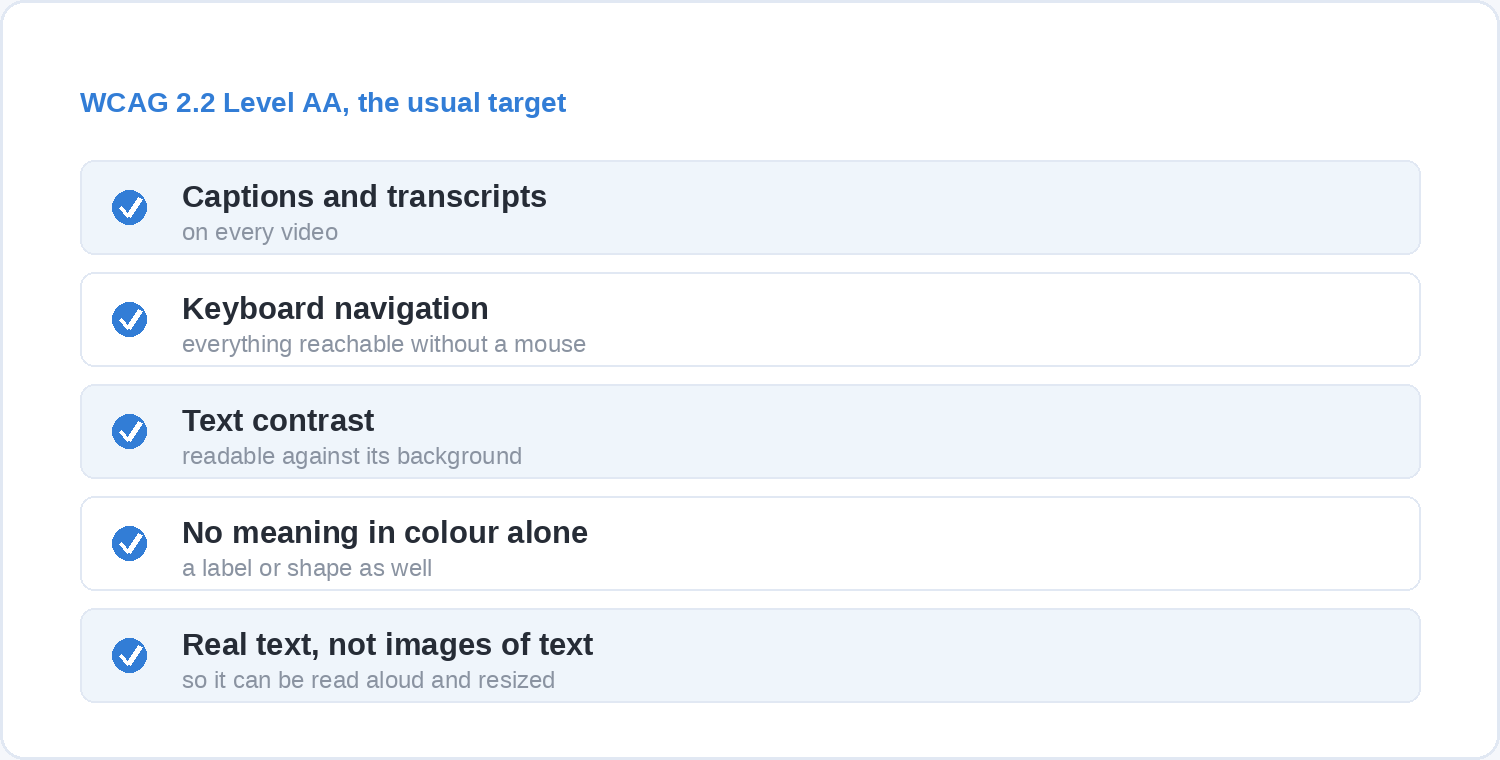
Accessibility is a design decision you make at the start or an expensive retrofit you make later. The reference standard is the Web Content Accessibility Guidelines, and version 2.2 became a W3C Recommendation on 12 December 2024. It defines three conformance levels, A, AA and AAA, and AA is what most organisations aim for.
In practice that means captions and transcripts on video, everything reachable by keyboard as well as mouse, enough contrast between text and background, no information carried by colour alone, and real text rather than words baked into an image. None of it costs anything if you decide it before the first screen is built.
Legal requirements differ depending on where your organisation operates and who it serves, so check what applies in your own jurisdiction rather than assuming. Designing to AA from the start puts you in a reasonable position whatever the answer.
Pilot with five people before you roll it out to five hundred
Watch five people from the real audience take the course, ideally on the devices they will actually use. Sit with them, say as little as you can manage, and note where they hesitate, where they click the wrong thing, and where they scroll past something you thought was important.
What you are looking for is not whether they liked it. Ask a learner how they found a course and they will be polite. Watch them get stuck on a question whose wording is ambiguous, and you have a defect you can fix in ten minutes. Time the run too, because the gap between how long you think a module takes and how long it takes is usually large and always in the same direction.
Fix what the pilot found, then release. A course that has been through five real users is a different object from one that has only been through a review meeting.
What should you actually measure?
Completion is attendance. It tells you the course was opened and finished, which is worth knowing and is not evidence of anything else.
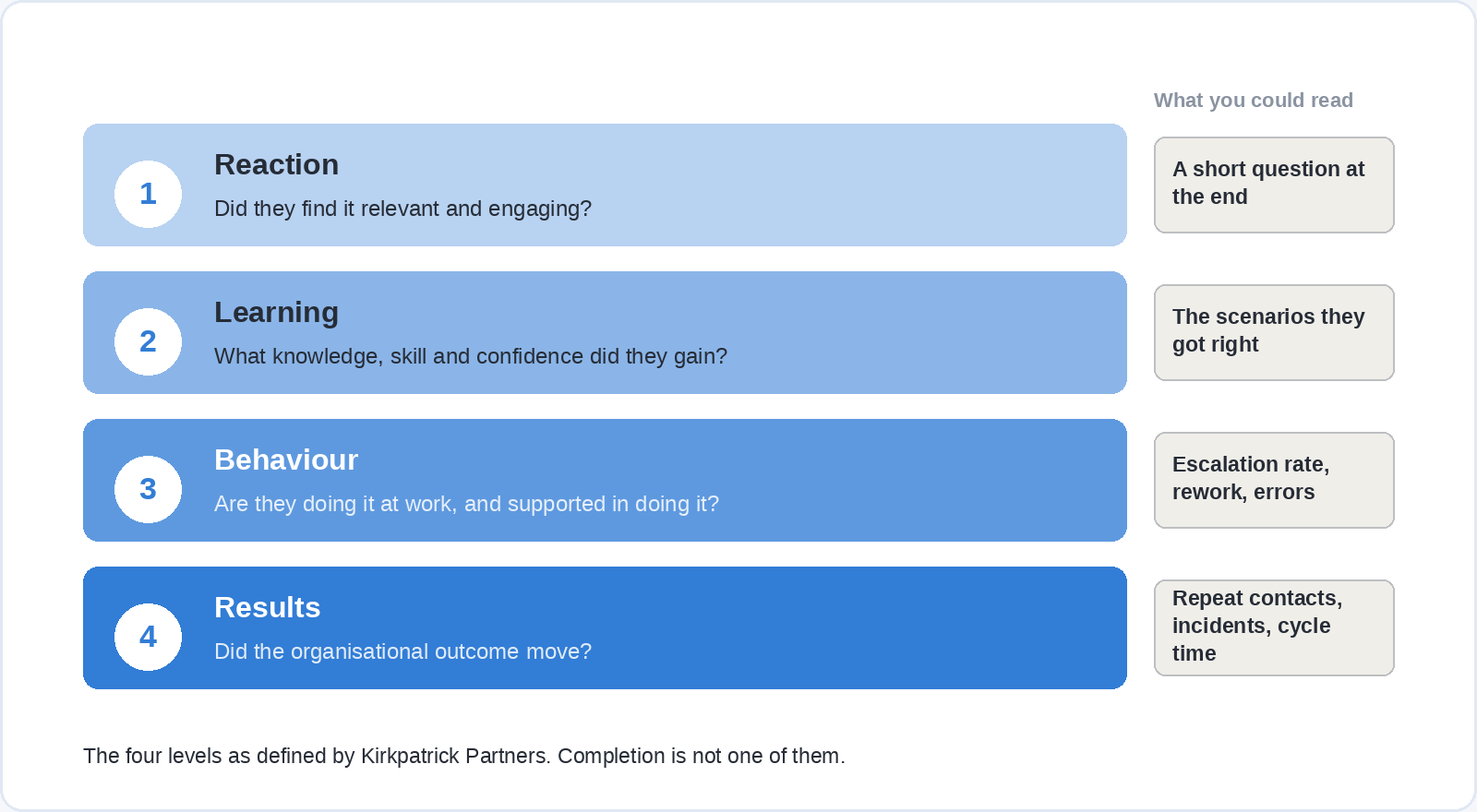
The four-level model published by Kirkpatrick Partners is the standard way to do better. Level 1, Reaction, measures how far the audience found the experience favourable, engaging and relevant. Level 2, Learning, measures the knowledge, skills, attitude, confidence and commitment they acquired. Level 3, Behaviour, measures how far they actually perform the critical behaviours at work and are supported and held accountable for doing so. Level 4, Results, measures the organisational outcomes that follow.
Most reporting stops at Level 1 and a quiz score, which is why training is so often described as unmeasurable. Level 3 is not hard so much as late: you have to decide before launch what you will look at, who will look, and when. Pick something that already exists in a system somewhere, such as escalation rates, rework, time to first successful transaction or safety incidents, and take a reading before the course goes out so the after has something to be compared with.
This is also where the action you wrote at the very start pays off. An objective phrased as an observable behaviour comes with its own measure attached, which is the practical reason for insisting on it.
Questions people ask about creating e-learning
What is the difference between an authoring tool and an LMS?
An authoring tool is where you build the course. A learning management system is where you host it, assign it and track who has done it. Some products do both, and some platforms let you author simple material directly, but the two jobs are separate and you usually choose them separately.
Can you create e-learning for free?
Yes, if you are willing to host it yourself. H5P is MIT-licensed, Adapt is GPL-licensed and Moodle is free to install, which covers authoring, delivery and tracking at no licence cost. What you pay instead is setup, hosting and someone’s time to maintain it, so free is a real option for a small team with technical support and a poor one for a team without.
How much does it cost to create e-learning?
Software is the smallest line. Authoring licences run from nothing for the open-source tools to $970 to $1,749 per author per year for the mainstream commercial ones. The real cost is expert time: the person who knows the process has to sit down and explain the decisions it involves, and review what you build from it. Budget that first and the rest is affordable.
Do you need an instructional designer?
For one module about your own process, no. You need someone who will ask “what should the person do differently” and keep asking it. For a programme covering several roles, with compliance requirements and a measurement plan, the expertise earns its cost quickly, whether you hire it or grow it internally.
How long should an e-learning module be?
Aim for one action per module and under ten minutes, with five as a better target. Longer material is better split than compressed, because a series of short modules can be spaced across weeks, and spacing is one of the few things that reliably improves what people still remember later.
How do you know if it worked?
Decide the answer before you launch. Name the behaviour you expect to change, find the number that already tracks it, take a reading now, and take another one a few weeks after the course goes out. If no such number exists anywhere, that is worth knowing before you spend the budget rather than after.
Where to take it from here
Build the first module small: one action, one set of real decisions, five pilot users, one number you will check in six weeks. A single well-aimed module that changes something is a better argument for a learning budget than a full catalogue nobody finishes.
If the generic half of your plan can be bought rather than built, that frees your expert time for the part only you can make. Soofos for Business gives every seat all 600+ courses, learning paths you can assign with deadlines, progress you can export for audits, and room to add your own private company training next to it, from five seats to five thousand.