
Someone has decided your organisation needs an academy, and the search results are not much help. Almost every English guide to setting up an online academy answers a different question: how to build a business selling courses to the public, starting with a niche, a price and a plan for the first hundred learners.
An internal academy has none of those problems. The learners already work for you, the subjects are already obvious, and nobody has to be persuaded to buy anything. It can still end up as a login nobody uses, because the scarce resource inside a company is not content or learners. It is the hour in the week and the manager who asks how it went.
So this is the build in seven steps, in the order that protects that hour: scope it by role, buy most of it, choose the platform on what you will do weekly, give it one door, name an owner, launch it into calendars, and measure what changed at work.
What an online academy actually is
An online academy is one branded place where everyone in your organisation finds the learning that belongs to their role, on a platform that can assign it, track it and report on it. Three separate things have to be true at once, and they are usually bought or built separately.
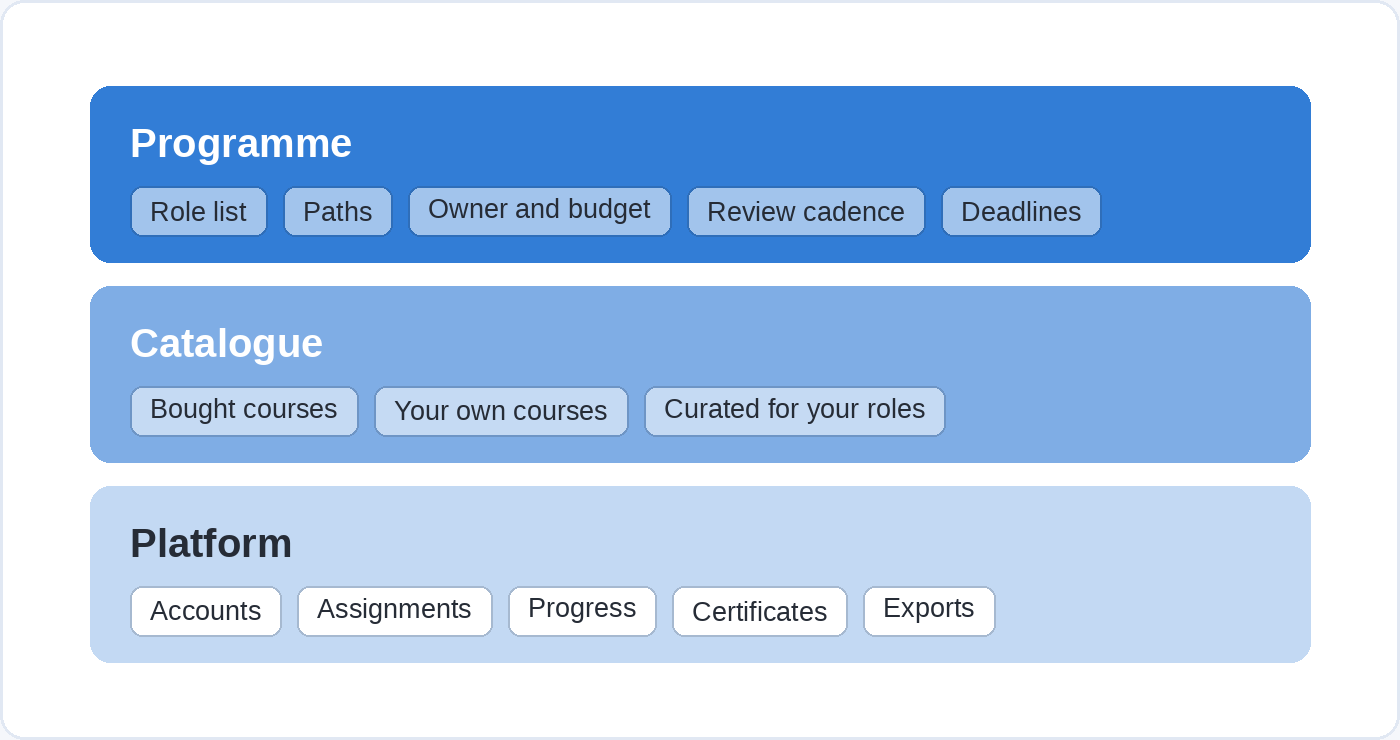
The platform is the software: accounts, assignments, progress, certificates, exports. The catalogue is the content on the shelf, some bought and some written by you. The programme is everything that makes the first two get used, which is the role list, the paths, the owner, the review cadence and the deadlines. Most projects buy a platform, fill it with a catalogue and never build the programme, which is why so many academies look finished and sit idle.
The word carries a second meaning that the search results mix in freely, so it is worth separating here. If your plan is to sell courses to the public rather than train your own people, the questions are about fees, audience and storefronts, and we have written those up separately in where to sell your online course and creating a free online course. Everything below assumes the learners are on your payroll.
Step 1. Scope it by role, not by subject
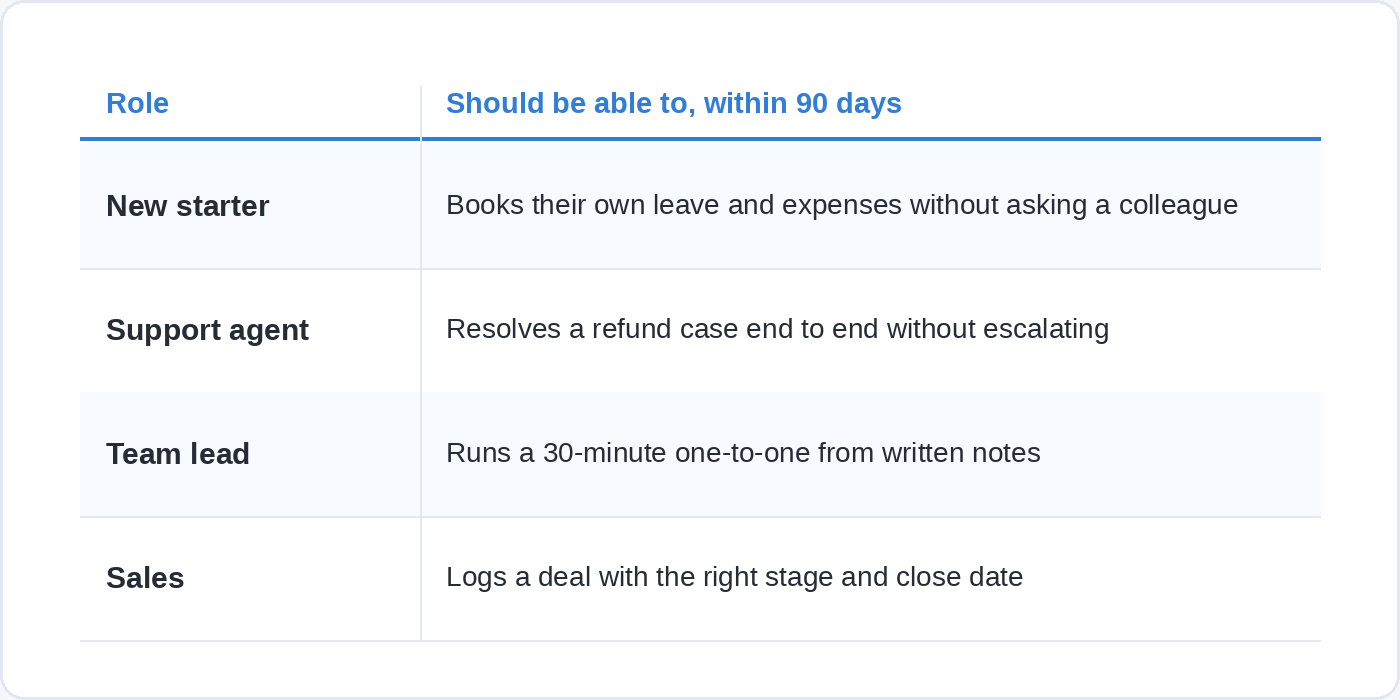
An academy’s scope is a list of roles and what each one should be able to do, because a list of subjects has no end and a list of roles does.
Write your roles down the left of a page. Most organisations have fewer than ten that matter for learning: new starter, sales, support, team lead, engineer, finance, and so on. Beside each one, write two or three things a person in that role should be able to do within their first ninety days, phrased as something you could watch them do. Not “understands the CRM” but “logs a deal with the right stage and close date”. Not “good at presenting” but “runs a fifteen-minute client update without rehearsing it twice”.
That list is the first version of your academy, and it is short enough to argue about in one meeting. It also tells you what to leave out, which is the part a subject list cannot do for you, because every subject looks worth adding when you read it on its own.
Designing a single module from one of those actions is a separate job with its own method, and we have covered it step by step in how to create e-learning. At this stage you only need the actions themselves.
Step 2. Buy almost everything, build only what is yours
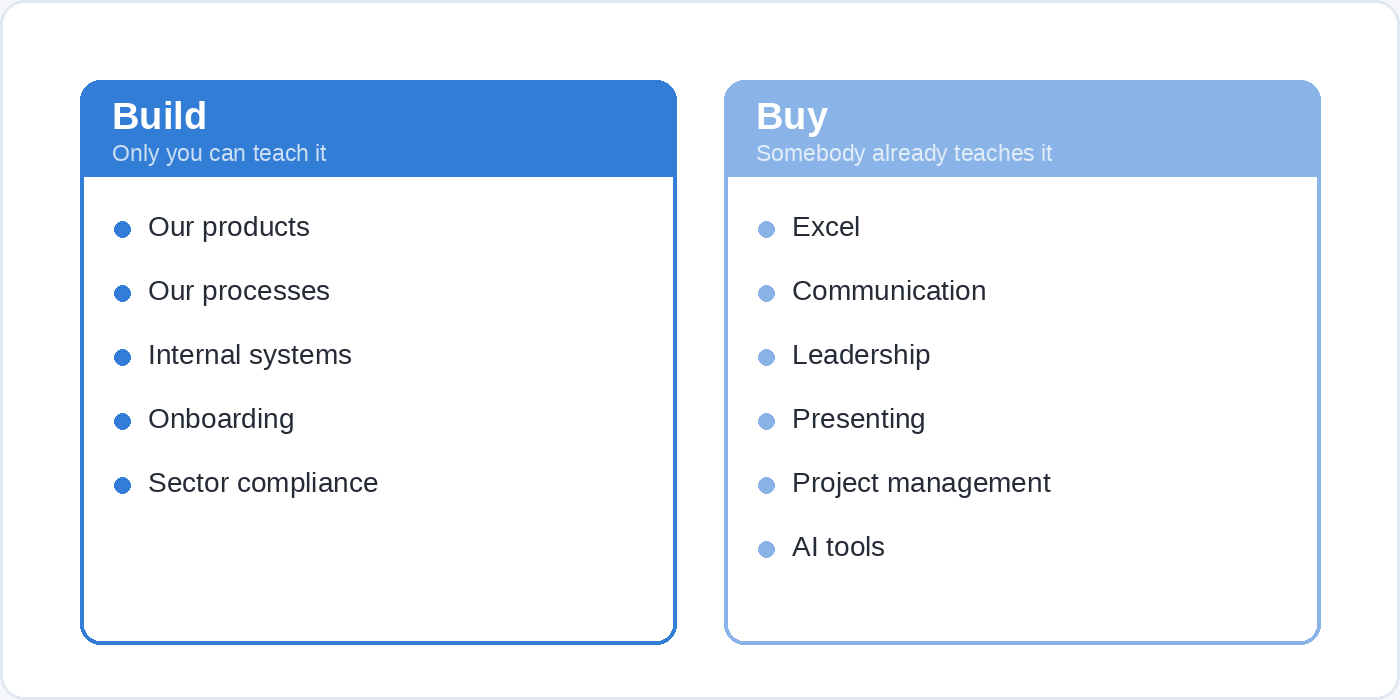
Buy anything that is not specific to your organisation, and build only what nobody outside it could teach.
The build list is shorter than people expect: your products, your processes, your internal systems, your onboarding, and whatever compliance training your sector requires in your own words. The buy list is everything else, and it is most of the academy. Excel, communication, leadership, presenting, project management, AI tools and time management are taught well by people who do nothing else, and they change often enough that maintaining your own version is a standing cost.
The finding turns out to be harder than the buying. In the TalentLMS 2026 L&D report, which surveyed 101 US HR managers and 1,000 US employees who had received training in the previous year, HR leaders rank finding the right training content as the second-biggest obstacle to the effectiveness of their L&D work. A subscription catalogue moves that problem from sourcing to curating, which is a smaller job.
On Soofos for Business a seat opens all 600+ courses, taught by more than 200 instructors, with 100 or so new courses added every year, and you can upload your own private company courses and assign them next to the bought ones. In practice that means one shelf your people browse, with bought courses and your own sitting next to each other under the same login.
Step 3. Choose the platform on the five things you will do every week
Judge a platform on the five operations you will repeat every week, not on the length of its feature list.
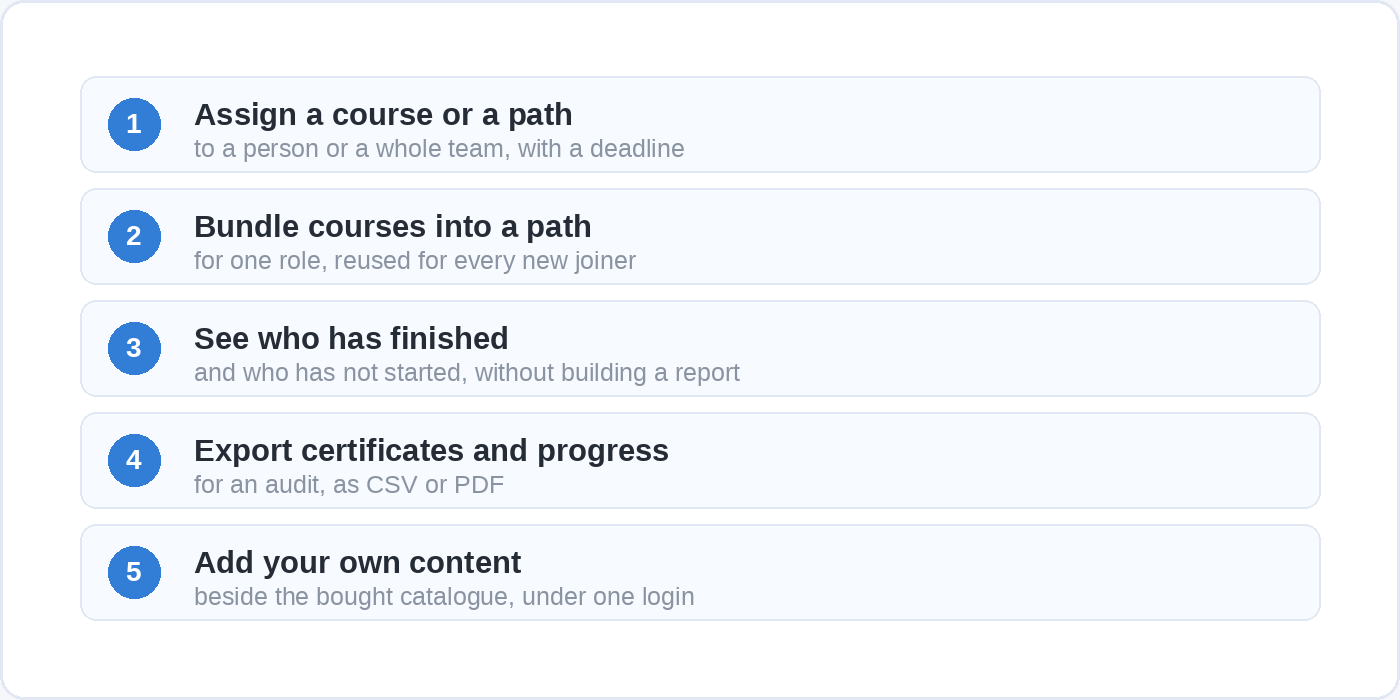
Those five are: assign a course or a path to a person or a whole team with a deadline; bundle courses into a path for a role, in the way Soofos builds its own programmes and learning paths; see at a glance who has finished and who has not started; export certificates and progress for an audit; and add your own content beside the bought catalogue. If any one of those takes more than a couple of minutes, you will stop doing it by the second month, and an academy that nobody assigns from is a catalogue.
Three shapes of answer exist, and they differ mainly in whether content comes with the software. Prices below are as each vendor publishes them, in the vendor’s own currency, checked on 26 September 2026.
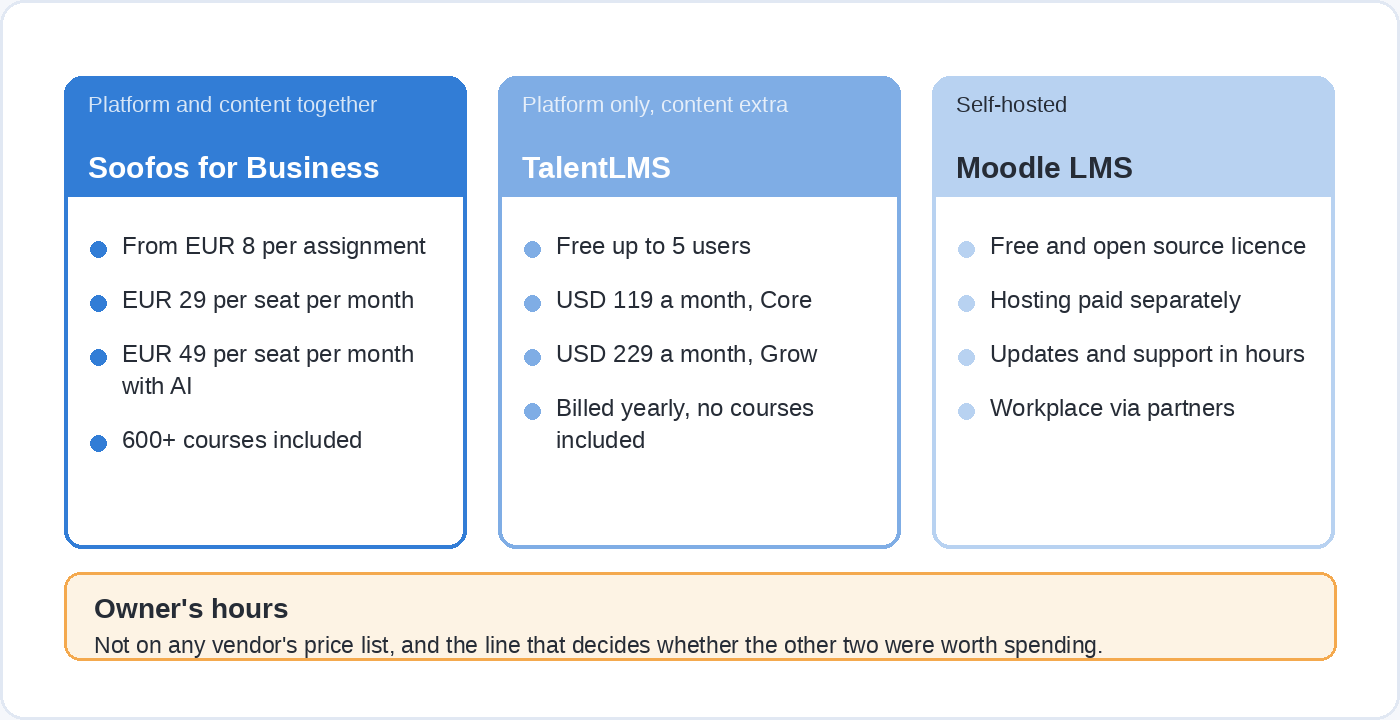
A content platform with team management gives you the catalogue and the dashboard together. Soofos sells this as three tiers: Assign from €8 per assignment with no seat commitment, Plus at €29 per seat per month for the full library with progress tracking and certificates, and Plus Pro at €49 per seat per month, which adds AI learning paths and a study coach for learners plus AI skill-gap analysis for managers.
A standalone LMS gives you the software and leaves the shelf empty. TalentLMS publishes its prices, which makes it a useful reference point: free for up to five users, then $119 a month on Core, $229 on Grow and $449 on Pro when billed yearly, with custom pricing for larger numbers. None of that includes a single course, so the content budget sits on top.
Self-hosting is the third route. Moodle LMS is free and open source, so the licence costs nothing and the running costs are entirely in hours, because somebody in your organisation has to host it, update it and answer questions about it. Moodle Workplace, which adds the corporate features, is not open source and is sold only through Moodle’s certified partners, with the price set by the hosting and services you buy.
Step 4. Give it one door
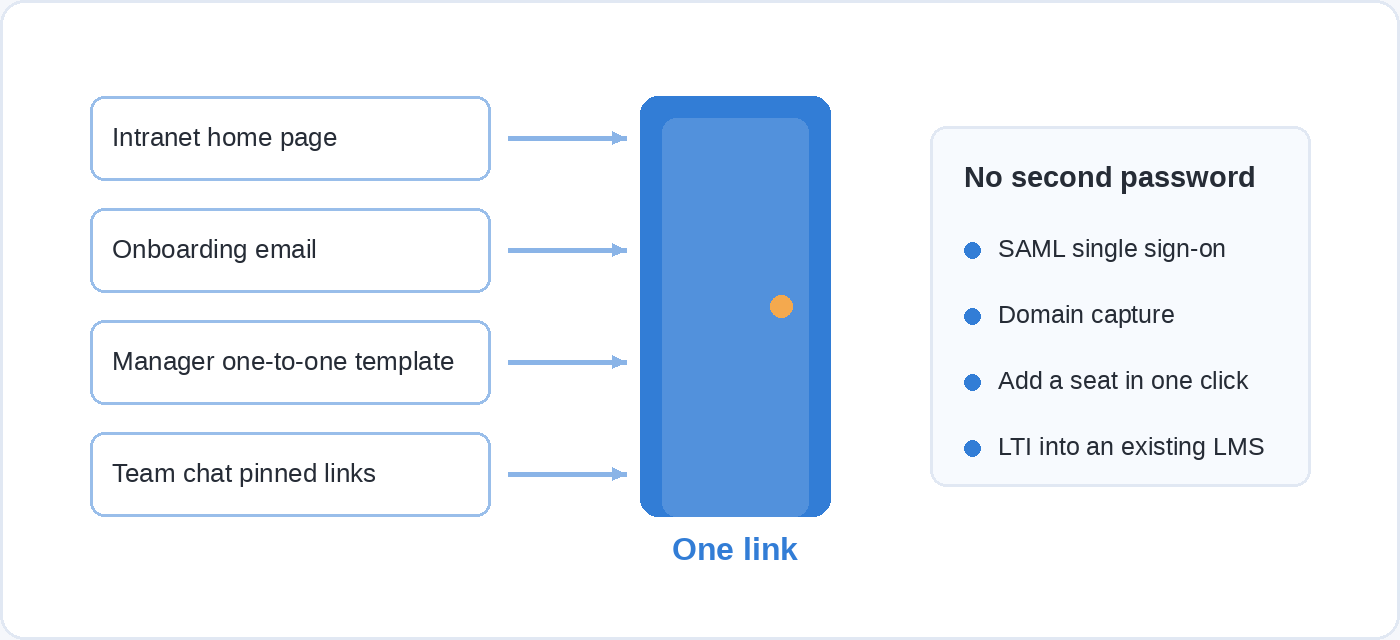
The academy needs one address people reach without a new password, linked from the places they already work.
This sounds like an IT detail and it is the difference between a busy academy and a dormant one. A separate login is a reason to postpone, and nobody goes looking for a link they half remember from an email in March. Single sign-on through SAML, domain capture so that anyone with a company address can activate their own seat, and adding a seat in one click when someone joins are all standard on team plans now, including Soofos for Business, which also offers LTI integration into an existing LMS on request. If you already run an LMS for compliance, the bought catalogue can sit inside it rather than beside it.
Then put the one link in four places: the intranet home page, the onboarding email, the manager’s one-to-one template, and wherever your team chat pins its useful links. Four places takes an afternoon and does more than a launch presentation, because each one catches somebody at a moment when learning is already on their mind.
Step 5. Name an owner, a budget and a retirement rule
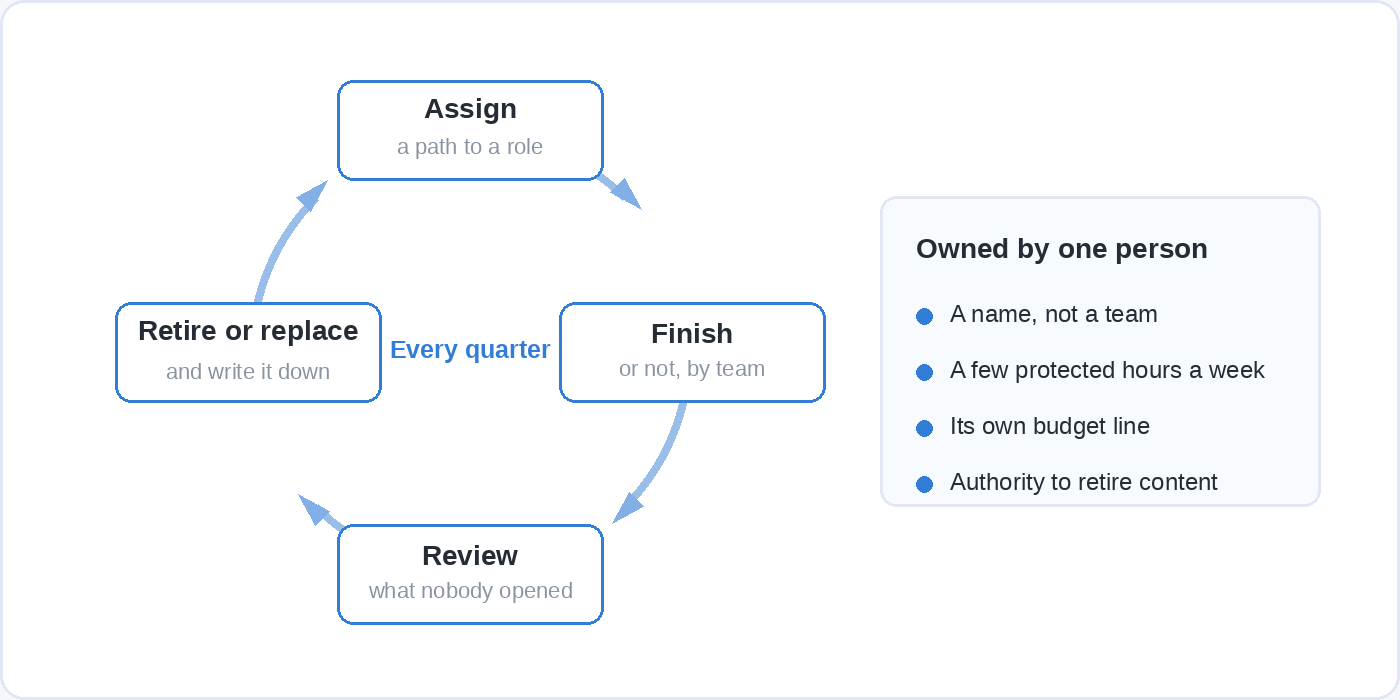
Somebody has to own the academy by name, with hours in their week, or it stops being maintained and becomes a folder of links that happens to have a login screen.
The owner does not need to be a full-time learning professional. They need a few protected hours, the authority to assign, and a budget line that is visibly theirs rather than a corner of someone else’s. Give the role a quarterly review with three questions: what got assigned, what got finished, and what nobody opened.
That third question is the one that needs a rule attached to it, because catalogues only ever grow. Decide now that anything nobody has opened in two review cycles either comes off the shelf or gets replaced, and write the decision down while it is still hypothetical. A shelf of four hundred items that nobody has curated is harder to use than a shelf of forty that somebody has.
Governance is the other half of the owner’s job, and it is two sentences long at this stage: who may publish internal content, and who signs off anything with a compliance consequence. The wider question of running an in-house content operation, with writers, a process and a cadence, is a bigger subject and a later one.
Step 6. Launch it into calendars, not into an all-hands
What decides whether an academy gets used is not the announcement. It is whether the time exists and whether managers ask about it.
The time problem is measurable and it is the same everywhere. In that TalentLMS survey, half of learning leaders and 53% of employees say high workloads leave little room for training even when it is needed, and lack of time has ranked as the number one obstacle for three years running. Nearly half of employees (46%) and HR managers (49%) agree that their company views training as time away from “real” work. Multitasking during training reached its highest level in three years in 2025, climbing to 70% from 58% the year before. An academy launched into that without protected time is competing with a full inbox for the same half hour, and the inbox has a person waiting on the other end of it.
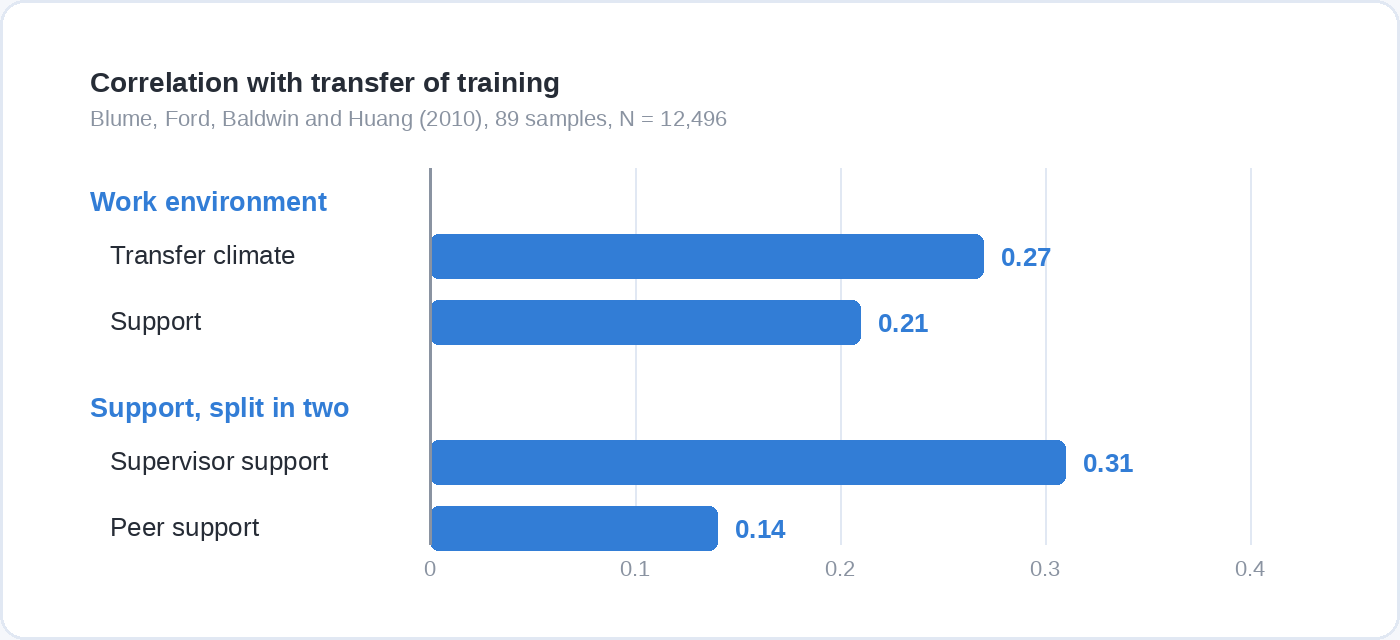
The manager half has a longer research record. Blume, Ford, Baldwin and Huang’s 2010 meta-analysis of training transfer pooled 89 sources covering 12,496 people and found that transfer climate, meaning the conditions people come back to, had the highest relationship with whether training changed behaviour at .27, followed by support at .21. Splitting support in two, supervisor support correlated .31 with transfer against .14 for peer support. The environment a person returns to predicts application better than most things you can change about the course itself.
So the launch is three concrete acts rather than a presentation. The first assignment carries a deadline and a named manager who knows it was sent. The hour goes in the calendar as an appointment, blocked like any other meeting. And the manager asks how it went in the next one-to-one, which takes thirty seconds and does more for whether the training sticks than anything else in the chain.
Start with one team rather than the whole organisation, for the same reason you pilot a module with five people before five hundred. A first cohort of twenty will show you which of your ninety-day actions were vaguely written, in front of twenty people rather than two thousand.
Step 7. Measure what changed, not who clicked
Completion tells you an academy was opened. It does not tell you anything worked, and reporting it as a result is how learning budgets lose arguments with finance.
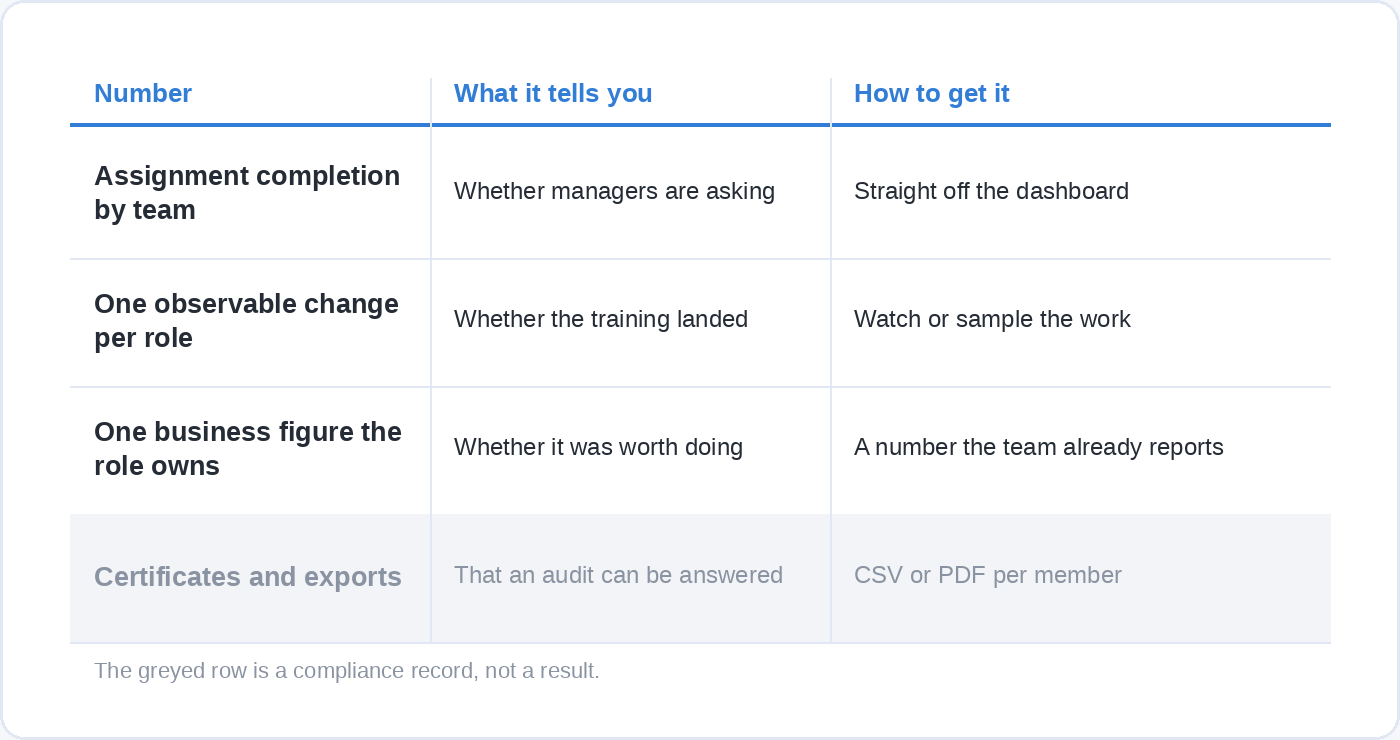
Three numbers are enough, and the useful ones sit at different levels. The operational number is assignment completion by team, which is a management signal rather than an outcome and is worth watching for exactly that reason: a team sitting at 20% while its neighbour is at 80% is telling you something about the two managers. The behavioural number is one observable change per role, taken straight from the ninety-day list you wrote in step one, and counted by watching or sampling rather than surveying. The business number is one figure the role already owns, such as time to first closed deal for new sales hires or tickets resolved without escalation for support.
Certificates and progress exports belong in a separate pile marked compliance. You need them, auditors ask for them, and they say nothing about whether anyone got better at anything. Soofos for Business exports both to CSV or PDF per member, which covers the audit without pretending to be a measure of learning.
What an online academy costs
The cost is the platform, plus the content, plus the hours of the person who runs it, and the third is the one that gets left out of the budget.
Platform and content prices are published, as set out in step three. The owner’s time is not on anybody’s price list and it is the line that determines whether the other two were worth spending. Budget it explicitly, even if the number is half a day a week, because a €29 seat with nobody’s afternoon attached to it costs the same as one that gets assigned from.
The last line in the plan is not money at all. If you are paying for an hour of learning a week per person, that hour has to come out of a week that is already full, so someone senior has to say out loud that it is allowed and put it in writing where managers can see it. Written permission costs nothing and it is the only item on the list that buys your people the time the rest of the budget assumes they have.
Questions people ask about setting up an online academy
What is the difference between an online academy and an LMS?
An LMS is the software that holds accounts, courses, assignments and reports. An academy is the LMS plus a curated catalogue for your roles, plus the ownership and habits that get it used. You can buy an LMS in an afternoon and still not have an academy.
How long does it take to set up an online academy?
On a ready-made team platform with a bought catalogue, the technical set-up takes hours: create the organisation, invite people by email or domain, assign the first path. The part that takes real time is agreeing the role list and the ninety-day actions, and that is calendar time with other people rather than work you can sit down and finish.
Do you have to create your own courses?
No, and for most organisations creating everything is the wrong call. Buy the general skills and build only what is specific to you: your products, your processes, your systems, your onboarding. A platform that lets you upload private company courses alongside a subscription library gives you both on one shelf.
How many people does it take to run one?
One named owner with a few protected hours a week is enough to start, as long as they can assign, review and retire content without asking permission each time. What does not work is spreading the job across three people who each do it when they have a spare moment.
How do you get employees to actually use it?
Assign rather than announce, attach a deadline, block the time in the calendar, and have the manager ask about it in the next one-to-one. The research on training transfer puts supervisor support at .31 against .14 for peer support, so the manager’s thirty-second question is worth more than the launch email.
What should you measure?
Assignment completion by team as an operational signal, one observable change per role as the behavioural result, and one business figure the role already owns. Keep certificates and exports for audits and do not report them as outcomes.
Where to start
Pick one role, write down three things someone in it should be able to do in ninety days, and assign the first path to one team with a deadline this month. If you would rather start from a shelf that is already stocked, Soofos for Business gives every seat all 600+ courses with learning paths, a team dashboard and compliance exports, and lets you drop your own onboarding and process courses in beside them, from five people to five thousand.