There are three places to sell an online course: a marketplace that already has learners, a storefront you rent and run under your own name, or course software you host on your own site. Every fee on every one of those routes is the price of a single thing, which is who takes responsibility for finding the buyer. Once you know who that is in your case, the shortlist gets short quickly.
What follows is the money, checked on each company’s own pages on 23 September 2026. Platforms publish their prices in US dollars, so they are quoted that way here, and the percentages apply whatever currency you sell in.
Where can you sell an online course?
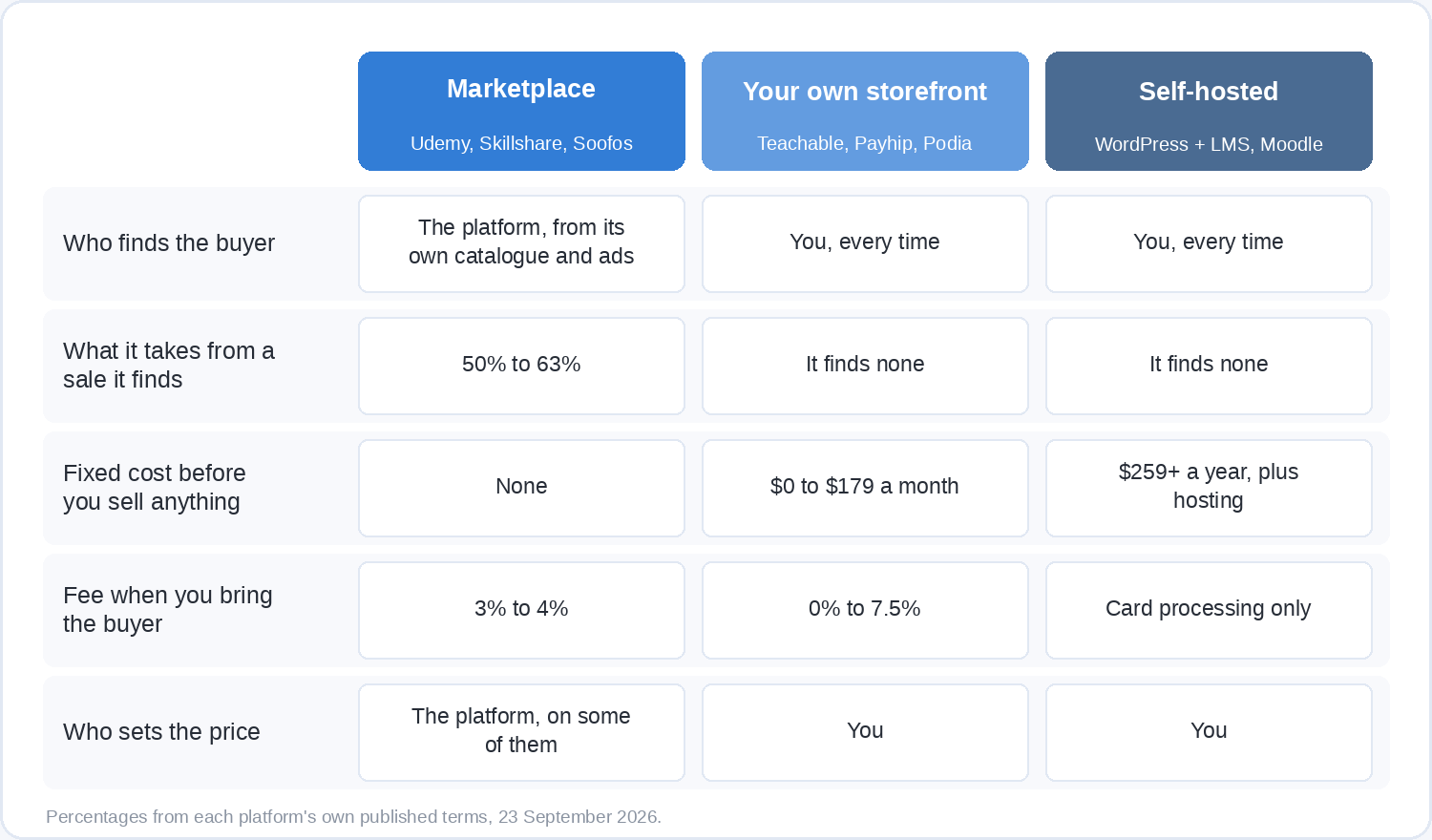
The three routes differ in what they hand you and what they hand back.
A marketplace is a shop with its own foot traffic. Udemy, Skillshare and Soofos all let you publish free of charge, and all three put your course in front of people who came looking for something to learn rather than looking for you. In exchange they take a share of every sale they generate, and on some of them they also decide the price.
Your own storefront is rented software with your name on the front: Teachable, Thinkific, Podia, Kajabi, Payhip, Gumroad, Systeme.io and a dozen more. You keep most of the money. Nobody arrives by accident, so every single buyer comes from something you did.
Self-hosting means running the course on your own website, usually WordPress with a learning plugin, or an open-source platform like Moodle. You keep everything except payment fees, and you own the updates, the backups, the refunds and the support inbox.
Most working instructors end up using more than one of these, which is a decision worth making deliberately rather than by drift.
What does a marketplace actually pay?
A marketplace pays you a percentage that depends on who brought the learner, and the gap between the two percentages is usually enormous.
Udemy
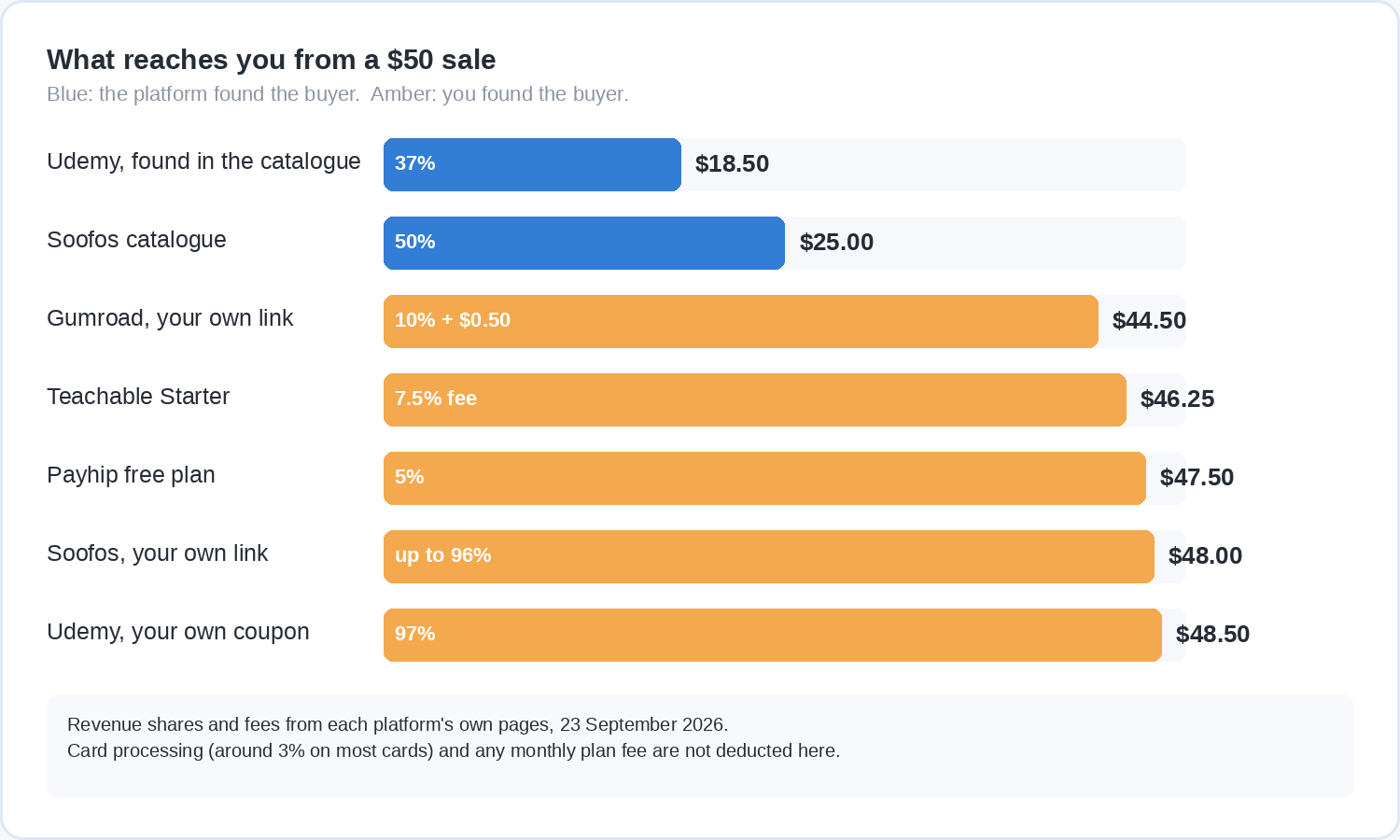
Udemy’s own figures are 84 million learners, 90,000 instructors, 290,000 courses and 78 languages. Its revenue share is two numbers: 37% when the sale comes from Udemy itself, through search, browsing or its advertising, and 97% when the buyer arrives through your own coupon or referral link. Both are calculated on the net amount, which is what the learner paid after taxes and after any platform fee, including the 30% Apple and Google charge on purchases made in the mobile apps.
The part that surprises people is the price. Udemy’s dynamic pricing engine sets the list price your course is sold at, and you set a backup price that applies when the engine’s price is not in play. If you join the Deals Program, Udemy discounts your course in its promotions, which are targeted by region, market and device, so two learners can see two different prices for your course on the same afternoon. Since October 2023 a newly published paid course cannot be discounted in the US for its first 14 days, though your own instructor coupons still work in that window. Selling on Udemy means accepting that the marketplace, not you, decides what a catalogue sale is worth.
Skillshare
Skillshare does not sell your class at all. Publishing one is free, members pay a subscription, and teachers are paid monthly from a Teacher Fund pool that is split according to qualifying minutes watched, adjusted for things like subscription type, free-trial conversions and regional pricing.
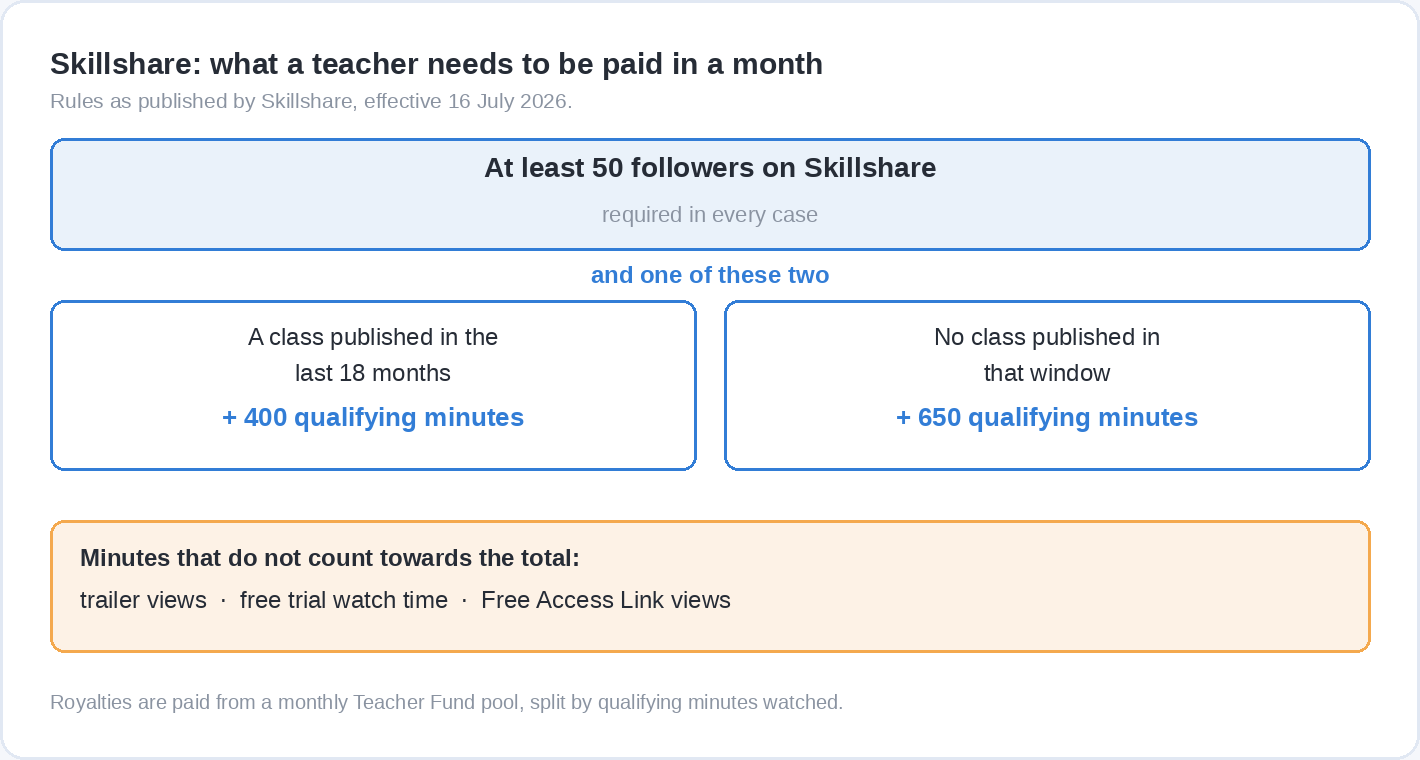
The thresholds are what decide whether that model is worth your time, and they moved recently. From 1 January 2026 a teacher needs at least 50 followers on Skillshare to qualify for a royalty payout. As of 16 July 2026 they also need either a class published within the last 18 months plus 400 qualifying minutes watched in the month, or 650 qualifying minutes if they have not published in that window. Trailer views, free-trial watch time and Free Access Link views do not count towards any of it, and payments run monthly through Tipalti on the 16th. When Skillshare announced the follower rule it said 90% of the teachers who would stop qualifying had been earning less than $5 a month, which is a useful description of what the bottom of a royalty pool looks like.
Soofos
Soofos pays per enrolment rather than per minute for single sales, and publishing is free. A sale made through the Soofos catalogue pays you 50% of the revenue. A sale that comes through your own promotion link pays up to 96%, with the exact split set by the general and affiliate terms. Subscribers on Soofos Plus earn you money on watch time instead, so a course can keep paying after the wave of one-off sales has passed. Payouts are monthly, with statements in your Studio dashboard.
Two conditions come with it. Every course is reviewed before it goes live, with a stated bar of mostly self-made video at 720p or better, clear audio and a real learning outcome. And you keep ownership of everything you make: Soofos gets the right to sell and show the course, and you stay free to offer the same course elsewhere. You also get a public instructor profile that collects your courses and reviews in one place, which is the sort of thing a rented storefront makes you build from scratch.
What does your own storefront cost before it sells anything?
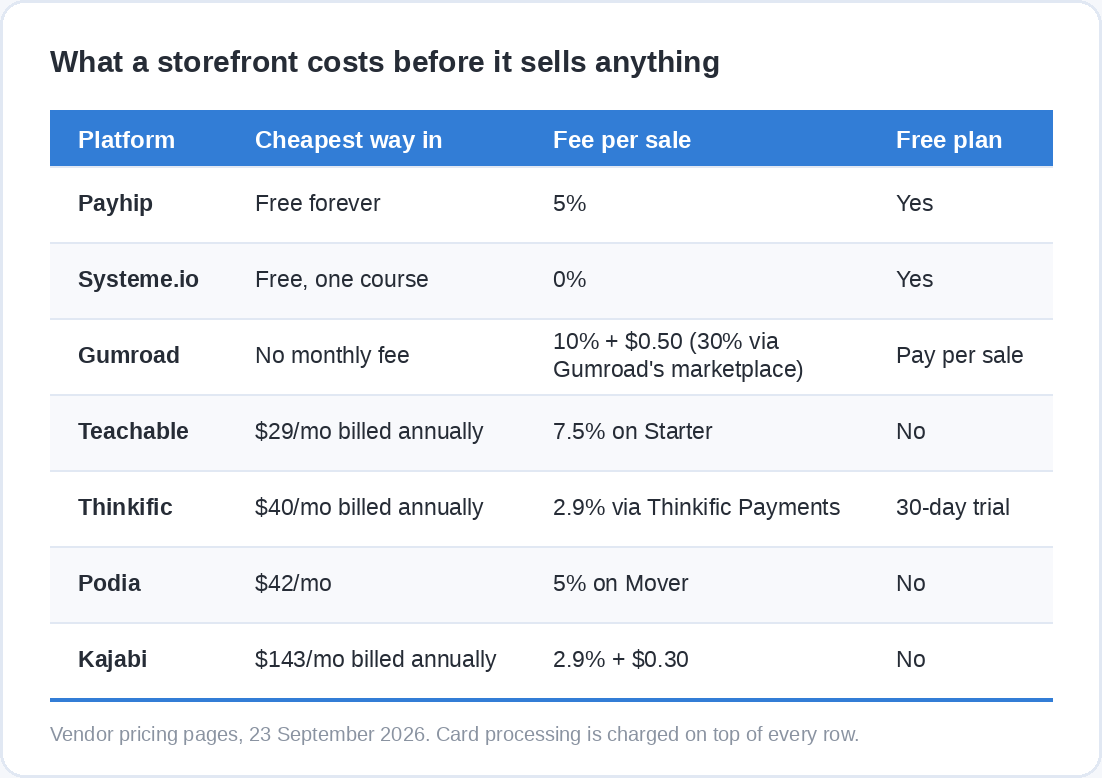
A storefront charges you a fixed monthly fee, a percentage of each sale, or both, and the fixed fee arrives whether or not anyone buys.
The current entry prices, all from the vendors’ own pricing pages:
- Payhip has a genuine free plan with unlimited products and a 5% transaction fee. Plus is $29 a month with 2%, Pro is $99 a month with no transaction fee.
- Gumroad charges no monthly fee at all: 10% plus $0.50 on a sale through your own link, and 30% when a buyer finds you through Gumroad’s marketplace. Since 1 January 2025 Gumroad acts as merchant of record and handles sales tax obligations itself.
- Systeme.io runs a free plan that never expires and needs no card: one course, 2,000 contacts, three sales funnels and no transaction fees. Paid plans start at $17 a month.
- Teachable starts at Starter, $39 a month or $29 billed annually, which carries a 7.5% transaction fee and a five-product limit. Builder at $89 a month, or $69 annually, drops the fee to zero when you use teachable:pay.
- Thinkific has no free plan any more, only a 30-day trial. Basic is $54 a month, or $40 billed annually, with 2.9% through Thinkific Payments.
- Podia also has no free plan. Mover is $42 a month with 5% fees and up to 100 email subscribers, Shaker is $84 a month with no Podia fees.
- Kajabi starts at Basic, $179 a month or $143 billed annually, with card processing at 2.9% plus $0.30.
If you read an article that still lists Teachable, Thinkific or Podia as free places to sell a course, it was written from an older version of their pricing pages, and it is worth treating whatever else it says with the same suspicion.
Payment processing sits on top of all of it. Stripe’s published US rate is 2.9% plus 30 cents per successful transaction, with another 1.5% for an international card and 1% more where a currency conversion is needed. Those rates vary by country, so check the figure for wherever your business is registered before you build it into a price.
What is involved in hosting the course yourself?
Self-hosting swaps a monthly fee for a workload, and it only pays off at volume or when you need control nobody rents you.
The common route is WordPress plus a learning plugin. LearnDash, now part of Liquid Web, is a self-hosted plugin at $259 a year for Essentials, $399 for Pro and $599 for Elite, with unlimited courses and learners and no per-student fee. Open-source platforms such as Moodle cost nothing to license. Neither figure is the real number, because you are also paying for hosting that can serve video, for the hours you spend on updates and backups, and for being the person who answers when a learner’s payment fails on a Sunday.
The upside is genuine. Your learner list is yours, your checkout is yours, no platform can change its terms underneath you, and at a few hundred sales a month the percentages you are no longer paying add up to real money. The trap is starting here, spending three weekends on the infrastructure, and discovering afterwards that the hard part was never the software. If you are still deciding what the course even contains, the step-by-step build comes first and the hosting question can wait.
How do you work out which route pays you more?
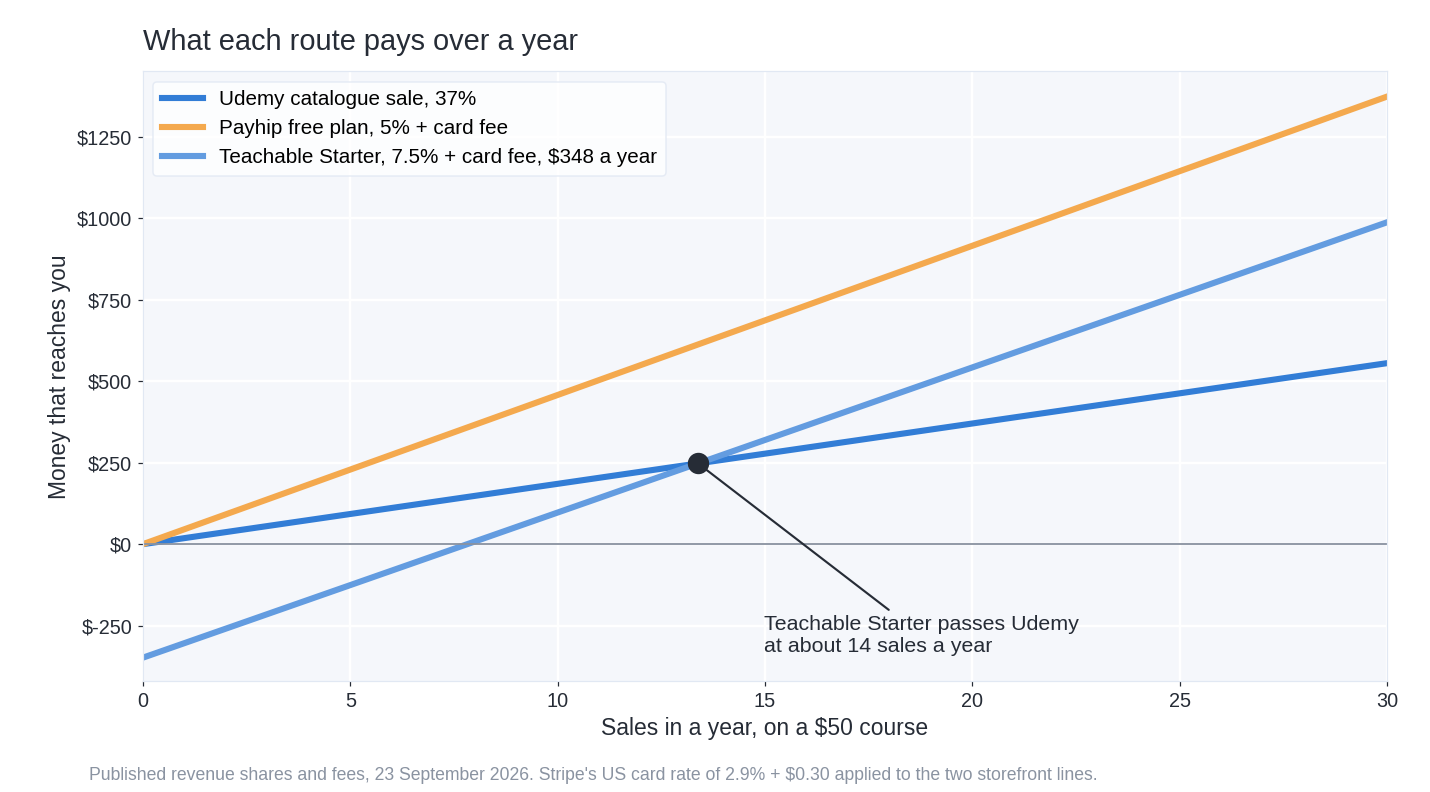
Price the course, apply each route’s cut, then divide any fixed cost by the difference per sale. That gives you the number of sales a year at which the expensive-looking route becomes the cheap one.
Take a course listed at $50. Through Udemy’s own catalogue you keep 37%, so $18.50 reaches you, and you paid nothing to be there. Through Payhip’s free plan you keep the price less 5%, less Stripe’s 2.9% and 30 cents, so about $45.75 reaches you, and again you paid nothing fixed. Through Teachable’s Starter plan at $29 a month billed annually you keep about $44.50 a sale after the 7.5% fee and processing, but you have already committed $348 for the year.
Set Teachable’s Starter plan against Udemy’s catalogue rate and the gap is $26 a sale, so the subscription pays for itself at roughly 14 sales in the year. That sounds easy until you remember the condition attached: on Teachable, all 14 of those buyers have to come from you.
Now run the comparison the listicles never run. A sale through your own Udemy coupon pays you 97%, which on a $50 sale is $48.50, more than any storefront in the list returns once its fee and card processing come out. A Soofos sale that comes through your own promotion link pays up to 96%, on a platform that charged you nothing to publish. If you are the one bringing the buyer, the marketplace is not the expensive option. It is often the cheapest place to land the sale, because you skip both the subscription and the setup.
Which turns the whole decision into a single question: over the next year, where are your buyers actually coming from?
Who is the seller, and who handles the admin?
On a marketplace the platform is normally the seller and handles the payment, the invoice, the refund and the sales tax. On your own storefront that is usually you, unless the tool acts as merchant of record, which is why Gumroad’s change in 2025 and Teachable’s own payment option matter more than their headline percentages.
This is worth an hour of attention before you launch rather than after your first international sale. Rules differ by country and by what you are selling, so check your own position, and if the answer is not obvious from the platform’s documentation, ask an accountant where you are registered. A marketplace that handles it is doing real work for its share.
Do you have to choose one place?
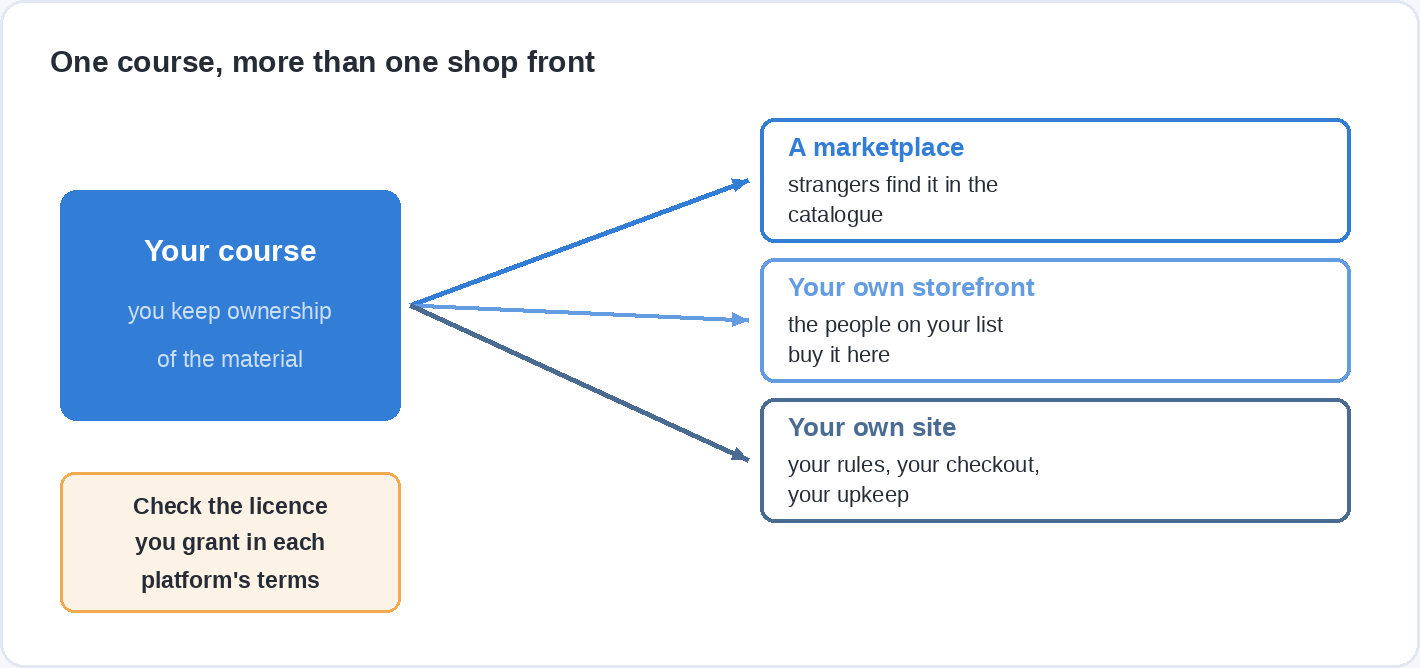
Usually not, and most established instructors do not. A marketplace is a discovery channel, your own storefront is a business, and they do different jobs.
A pattern that works: put the course on a marketplace so strangers can find it, keep a version on your own storefront for the people who already follow you, and send your own audience to whichever of the two pays you more, which is often the marketplace coupon rather than the storefront. Soofos states plainly that you keep ownership and may offer your course elsewhere. Read the terms of every platform you join before you assume the same, because the licence you grant is the one clause in a platform agreement that is genuinely difficult to undo.
Which route fits your situation?
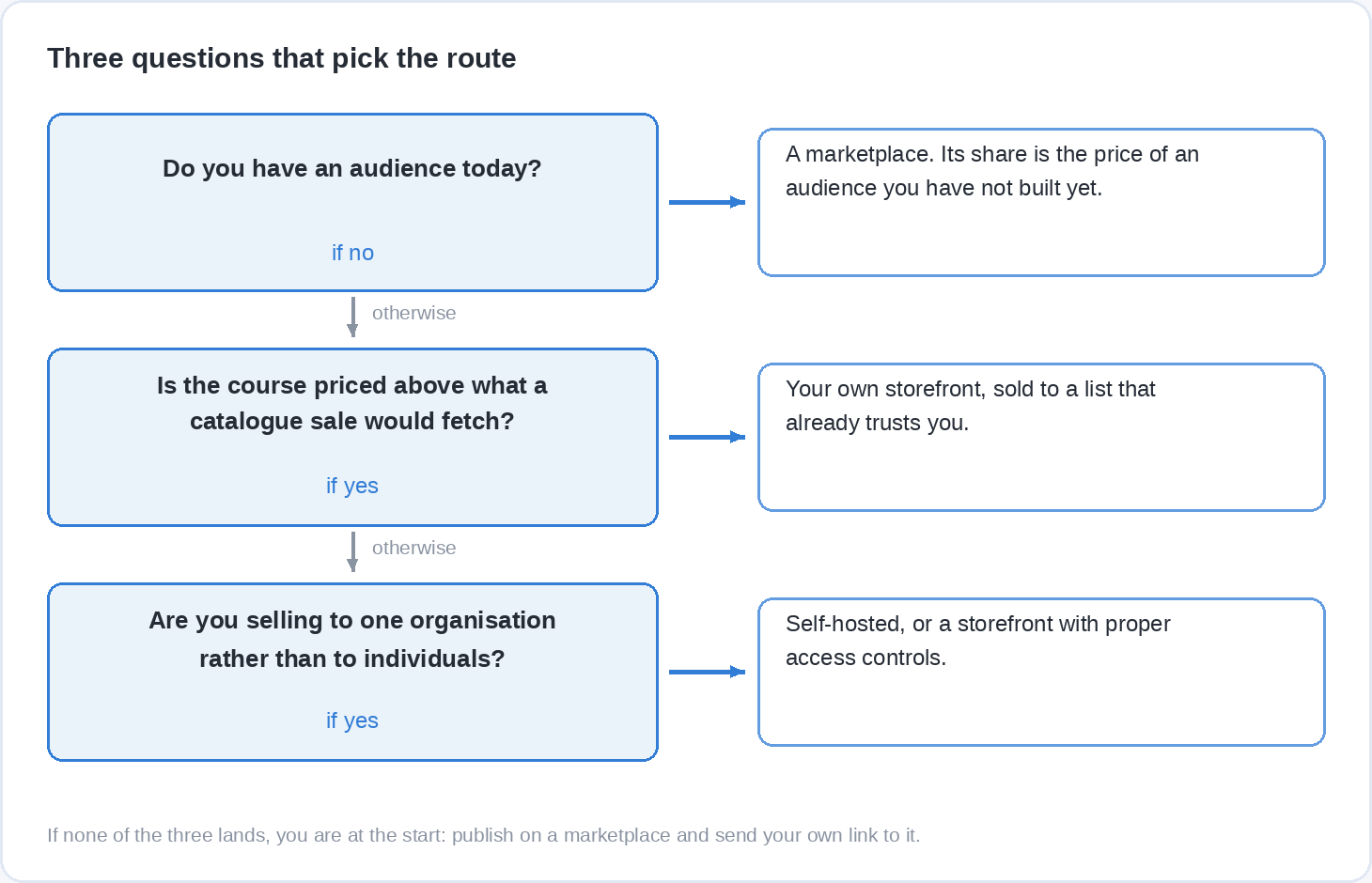
Three questions settle it for most people, and the first one carries most of the weight.
Do you have an audience right now? Not a vague sense that people know you, but an email list, a following, a community, a client base. If the answer is no, start on a marketplace. Its share is the fee for an audience you have not built yet, and 50% of a sale that happens beats 95% of one that does not.
Is your course worth more than a marketplace will charge for it? A specialist course for professionals priced in the hundreds does not belong in a catalogue where the platform’s pricing engine decides what it is worth. That course belongs on a storefront you control, sold to a list that already trusts you.
Are you selling to one organisation rather than to individuals? Corporate training, a membership, a licensed programme, anything with a contract behind it points at self-hosting or a storefront with proper access controls, because the buyer and the learner are not the same person.
Questions people ask before they pick a platform
Where is the best place to sell an online course if I have no audience?
A marketplace, because it is the only route where buyers arrive without you. Udemy has by far the biggest catalogue of the three, Skillshare pays by watch time rather than per sale, and Soofos pays 50% on a catalogue sale with free publishing and a review before your course goes live.
How much do course platforms take?
Between nothing and 63%, depending on who finds the buyer. Marketplaces take the most on sales they generate, at 63% on Udemy’s catalogue rate and 50% on Soofos. The same platforms take very little when you bring the buyer yourself, 3% on Udemy and from 4% on Soofos. Storefronts charge a monthly fee instead, from a free Payhip or Systeme.io plan up to $179 a month for Kajabi, plus card processing of roughly 3%.
Can I sell the same course on more than one platform?
Often yes, and it is a common strategy, but it depends on the licence you granted. Soofos states that you keep ownership and are free to offer the course elsewhere. Check the instructor terms of each platform you join, because exclusivity clauses are the detail people discover late.
Is it better to sell on Udemy or on my own website?
If Udemy finds the buyer, Udemy is better than nothing and you keep 37%. If you find the buyer, your own site keeps more than a Udemy catalogue sale, but your own Udemy coupon keeps more than either, at 97%. The real comparison is not platform against platform; it is whether you can reliably send traffic to a checkout.
Do I need a website to sell an online course?
No. Marketplaces, Payhip, Gumroad and Systeme.io all give you a hosted page you can link to, and a free plan is enough to take your first payment. A website earns its place when you are running your own marketing and want the traffic to land somewhere you control.
What does it actually cost to start selling a course?
Nothing, on several routes. Publishing on Udemy, Skillshare and Soofos is free, Payhip and Systeme.io have free plans, and Gumroad charges only when you sell. The costs that matter first are your time and your recording setup, not the platform.
Start where the learners already are
If you have not sold a course yet, the fastest way to find out is to put it somewhere that already has people in it and watch what happens. Publishing on Soofos is free, every course is checked before it goes live, you keep ownership of your material, and you earn 50% on a catalogue sale or up to 96% when you bring the learner yourself. Apply to teach on Soofos, and let the first sales tell you whether the storefront is worth building.