In March 2025 the Oscar for Best Animated Feature went to Flow, a film about a cat in a flooded world that Gints Zilbalodis and a small team made in Blender, a program anyone can download for free. Price is rarely what separates one animation program from another. The difference is the kind of animation each one is built for: Krita for drawing frame by frame, Moho and Toon Boom Harmony for rigged 2D characters, Cavalry and After Effects for motion graphics, Blender for 3D, and Vyond for quick business explainers.
Most lists of the best animation software put all of these in one ranking, which is a little like ranking a pencil against a camera. This guide sorts nine programs by the job they do, gives what each costs and runs on as of 1 October 2026, and ends with a one-evening exercise that shows whether a tool suits you.
What kind of animation do you want to make?
Animation software falls into five families, and the right choice depends far more on the family than on the brand. Once you know which family you are in, the shortlist shrinks to two or three programs.
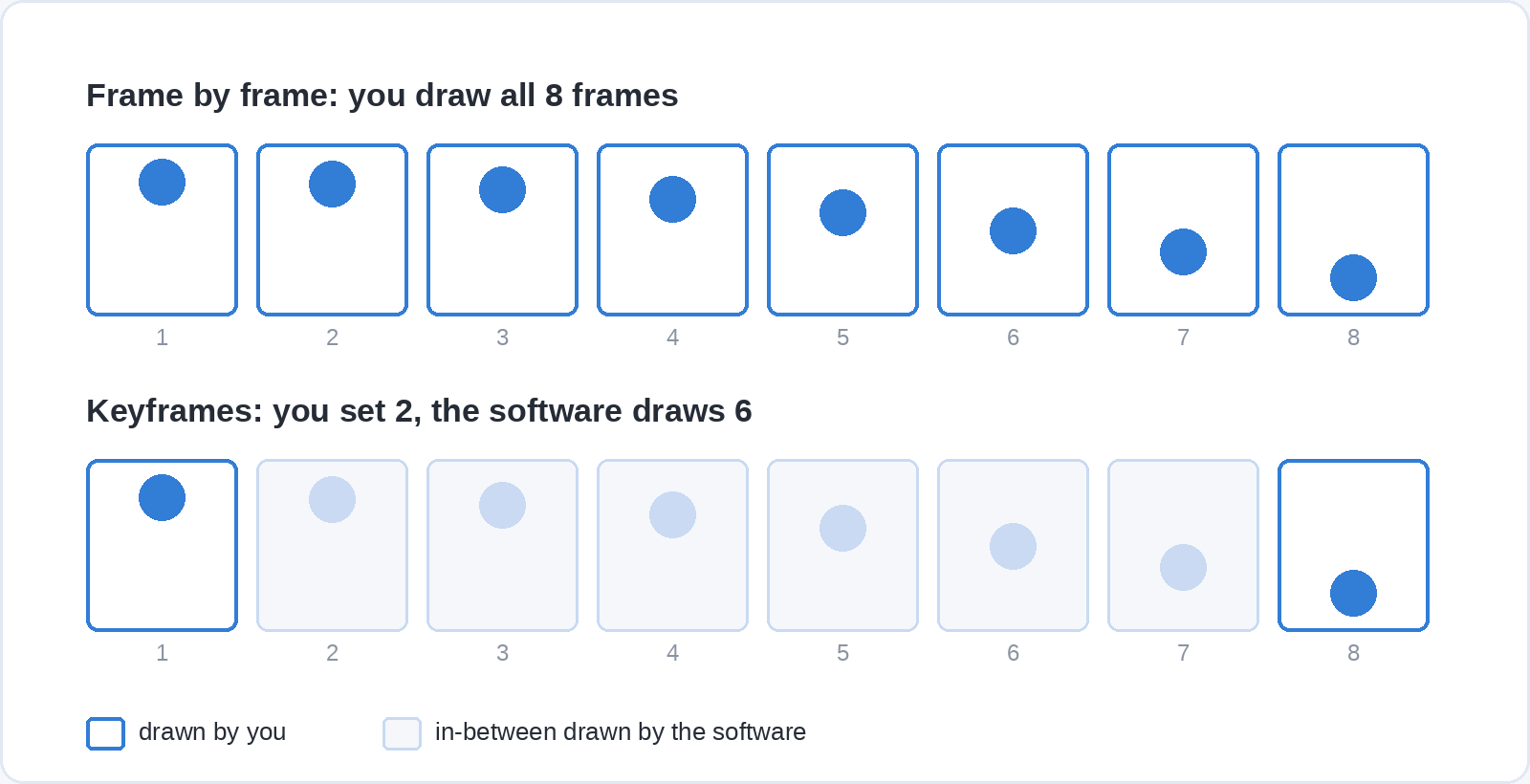
Frame-by-frame 2D means drawing every image yourself, the way hand-drawn film has always been made. You need good brushes, a timeline and onion skinning, which shows faint copies of the previous and next drawings so you can judge the movement. Rigged 2D (also called cut-out) builds a character from separate parts joined by bones, so you pose it instead of redrawing it, which is much faster per second of finished film. Motion graphics animates shapes, text, logos and charts with keyframes: you set a start and an end and the software fills in the frames between. 3D means modelling objects, rigging and posing them, then rendering images through a virtual camera and lights. Template explainers give you ready-made characters and scenes to arrange on a timeline, for training and marketing videos rather than craft.
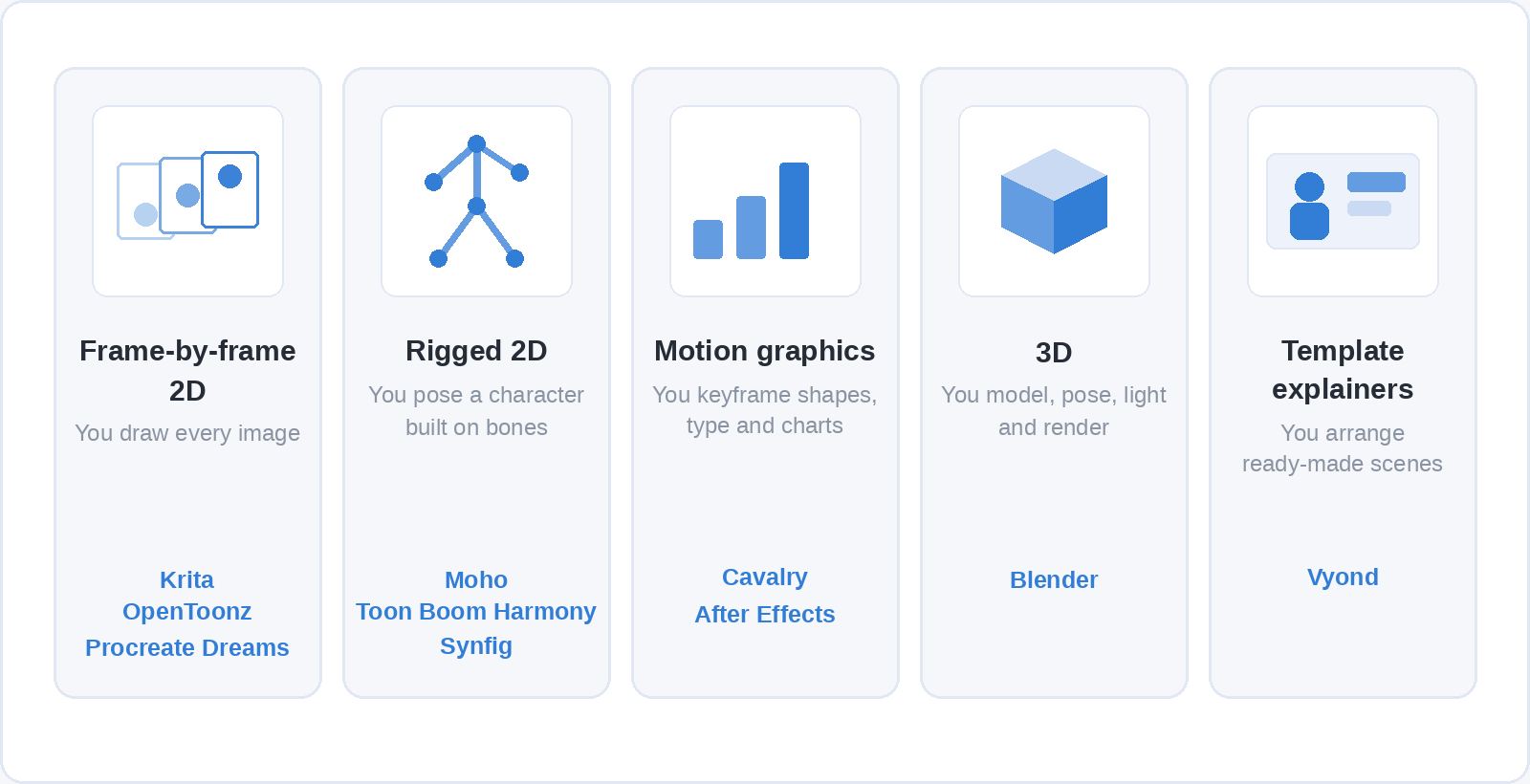
The families overlap at the edges. Blender has a full 2D drawing system inside it, Harmony handles frame-by-frame as well as rigs, and motion graphics is graphic design that moves, so everything in our guide to what graphic design is applies to it directly. Start from the family you care about most and expect a second tool to follow later.
The nine tools, sorted by job
Prices below are the ones each vendor publishes on its own site on 1 October 2026. Most quote in US dollars, so they are given as published; local prices and taxes differ, and Adobe’s vary enough by country that they are left out.
Krita: free frame-by-frame drawing
Krita is a free, open-source painting program for Windows, macOS and Linux with a frame-by-frame animation timeline built in. You draw on a frame, step forward and draw again, with onion skins showing the drawings on either side and transform masks for moving a drawing without repainting it. If you already draw digitally it is the gentlest way in, because the brushes and canvas behave like a painting app rather than an editing suite.
Its limits show on longer pieces. Krita keeps every frame in memory, so a long shot at a large size gets heavy, and it has no real sound or editing tools, so you export the frames and cut them together in a video editor. For short loops, character tests and learning timing, it covers everything a beginner needs.
OpenToonz: a studio pipeline at no cost
OpenToonz is the open-source release of Toonz, the 2D software developed by Digital Video in Italy and customised by Studio Ghibli, which used it from Princess Mononoke onwards. The Japanese company Dwango released it in March 2016 under a BSD licence, free for commercial and non-commercial use, for Windows and macOS.
It handles scanned paper drawings, colouring, frame-by-frame work and some rigging in one program, which is what a production pipeline needs. The interface is dense and the documentation thinner than the commercial tools, so expect to rely on community tutorials. It suits someone who wants a studio-style 2D workflow and is patient enough to learn it without paying for one.
Procreate Dreams: animating on an iPad
Procreate Dreams is an animation app for iPad, for any model that runs iPadOS 16.3 or later, sold as a one-off purchase of $12.99 in the US with regional pricing elsewhere. You can draw frame by frame with Procreate’s textured brushes, add keyframes to scale, rotate or blur a drawing, and use performance recording, where you move a drawing with your finger while the animation plays and the app records the motion.
It is the most immediate way to start if you already own an iPad and a stylus. It runs only on iPad, so a long project you may later want to move into a desktop studio pipeline is better started elsewhere.
Toon Boom Harmony: professional 2D
Toon Boom Harmony is a professional 2D package built for studio production, combining frame-by-frame drawing, bone and deformer rigging, and compositing in one program. It is sold by subscription only, in three editions: Essentials at $31 a month, Advanced at $79 and Premium at $143 on monthly billing, with lower yearly rates and student prices from $6.75 a month.
If you intend to work in 2D animation professionally, Harmony is worth learning, and Essentials is enough to learn the drawing and timeline side. For a hobbyist, a subscription is a lot to pay before knowing whether animation is for you, which is the gap the free tools on this list fill.
Moho: rigged characters for a one-off price
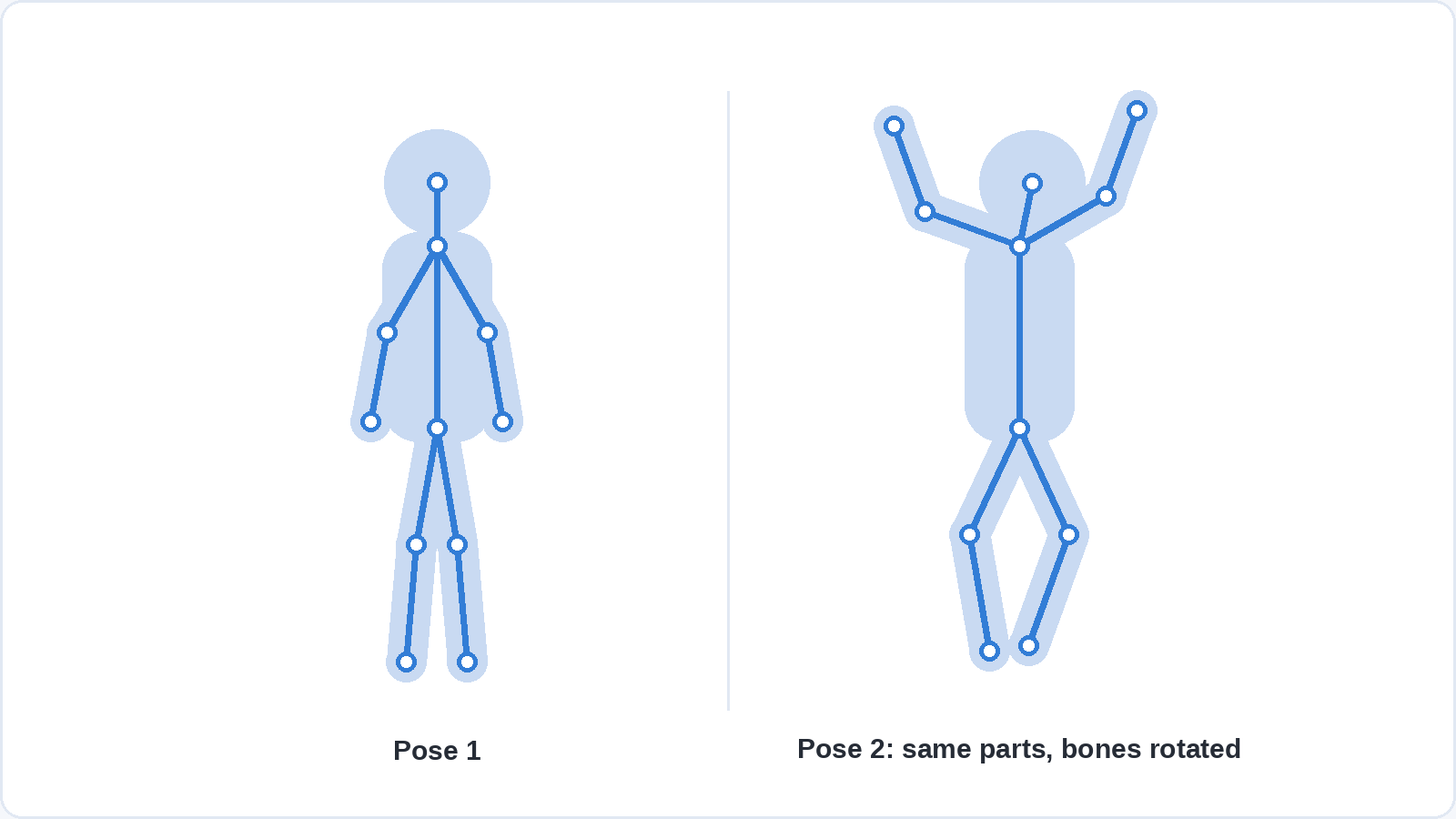
Moho is 2D animation software built around rigging: you draw a character once, give it a skeleton of bones and animate it by posing. Its Smart Bones let one bone also drive shape changes, such as a mouth opening or a hand turning, so a rig can do much more than rotate flat parts. It runs on Windows and macOS and is sold as a perpetual licence, $59.99 for Moho Debut and $399.99 for Moho Pro, with a free trial.
Debut includes limited versions of Pro’s main tools, which makes it a cheap way to find out whether rigged animation suits you. If you would rather pay nothing, Synfig is a free, open-source 2D program for Windows, macOS and Linux with vector tweening and a bone system that covers similar ground, with a rougher interface.
Cavalry: free motion graphics
Cavalry is a 2D motion design program for Windows and macOS that Canva bought in early 2026 and made free for individuals in April 2026, including for commercial projects. You sign in with a free Canva account, and organisations get it through Canva’s Enterprise and Education plans.
Cavalry is procedural, meaning you build systems instead of animating every element by hand: change one value and a whole grid of shapes responds, or connect a spreadsheet and animate a chart from its data. That makes it strong for logo animations, moving type, data visualisation and looping social media graphics that would take hours of keyframing elsewhere. If you already make static designs in Canva (our guide to what Canva is covers how its editor works), Cavalry is the next step once Canva’s built-in animations run out.
Adobe After Effects: motion graphics and compositing
After Effects is Adobe’s program for motion graphics and visual effects: animated titles, logo reveals, explainer graphics, and combining filmed footage with graphics. It works with layers and keyframes, links closely with Premiere Pro, Photoshop and Illustrator, and runs on Windows and macOS. It is sold by subscription only, on its own or as part of a Creative Cloud plan.
Its advantage is the amount built around it since its first release in 1993: templates, plug-ins and tutorials for almost any effect you can name. Character animation is possible with plug-ins, but After Effects is not designed for drawing, so a frame-by-frame animator will be happier in Krita or Harmony.
Blender: free 3D, with 2D inside it
Blender is a free, open-source 3D suite for Windows, macOS and Linux covering modelling, rigging, animation, simulation and rendering. Flow was rendered in its real-time engine, EEVEE. Blender also contains Grease Pencil, a 2D drawing and animation system that lets you draw frame by frame inside a 3D scene, so a camera can move around hand-drawn characters.
Its learning curve is the steepest on this list, mostly because 3D asks you to learn modelling, materials, lighting and rendering before an animation looks finished. The core animation skills, such as posing, timing and editing motion curves, carry over to paid packages like Autodesk Maya if you later need them.
Vyond: explainer videos from templates
Vyond is a browser-based tool for making animated business videos from ready-made characters, scenes and props: training modules, onboarding videos, product explainers. You arrange scenes on a timeline, pick actions for the characters and add a voice-over, without drawing anything. Plans are billed yearly, starting at $699 a year for the single-user Starter plan, and there is a free trial.
It is the right tool when the goal is a clear video by the end of the week rather than learning to animate. Everything comes from Vyond’s library, so the results share its look, and the skills do not transfer to the craft tools above.
How do the nine compare on price and platform?
The table puts the nine side by side. Free here means free to download and use; Cavalry’s free tier is for individuals, and organisations pay through Canva.
| Tool | Best for | Price | Runs on |
|---|---|---|---|
| Krita | Frame-by-frame 2D | Free, open source | Windows, macOS, Linux |
| OpenToonz | Studio-style 2D | Free, open source | Windows, macOS |
| Procreate Dreams | 2D on a tablet | $12.99 one-off | iPad |
| Toon Boom Harmony | Professional 2D | From $31 a month | Windows, macOS |
| Moho | Rigged 2D | $59.99 or $399.99 one-off | Windows, macOS |
| Cavalry | Motion graphics | Free for individuals | Windows, macOS |
| After Effects | Motion graphics and effects | Subscription | Windows, macOS |
| Blender | 3D, and 2D inside 3D | Free, open source | Windows, macOS, Linux |
| Vyond | Template explainers | From $699 a year | Web browser |
Four of the nine cost nothing, and between them they cover frame-by-frame 2D, motion graphics and 3D, with OpenToonz handling some 2D rigging as well. Cavalry is the most recent to join them: until April 2026 its Pro version was a paid subscription.
What happened to Adobe Animate?
Adobe Animate is still available, but Adobe has stopped adding features to it. On 3 February 2026 Adobe announced that Animate would be discontinued on 1 March 2026, then reversed the decision the next day after a strong reaction from users and put the program into maintenance mode: security and bug fixes continue, new features do not, and it remains on sale to new customers.
If you already work in Animate, there is no deadline forcing you off it. If you are choosing a 2D program today, a tool that is still being developed, such as Harmony, Moho or Krita, is the safer place to invest your learning time.
Can AI make the animation for you?
AI video generators such as Runway and Kling turn a text prompt or a still image into a short moving clip, and for mood pieces or backgrounds they can save time. They do not give you control over individual frames, keeping a character identical from one shot to the next takes extra work, and the terms for commercial use differ by service and plan.
Using them is a different activity from animating: you describe and choose rather than pose and time. They can sit alongside animation software in a project, but they do not teach timing, posing or spacing.
Which one should a beginner start with?
Start with a free program in the family you chose: Krita for drawn animation, Blender for 3D, Cavalry for motion graphics. All three can be used for commercial work, and if you outgrow one, timing and spacing carry straight over to Harmony, Moho or After Effects.
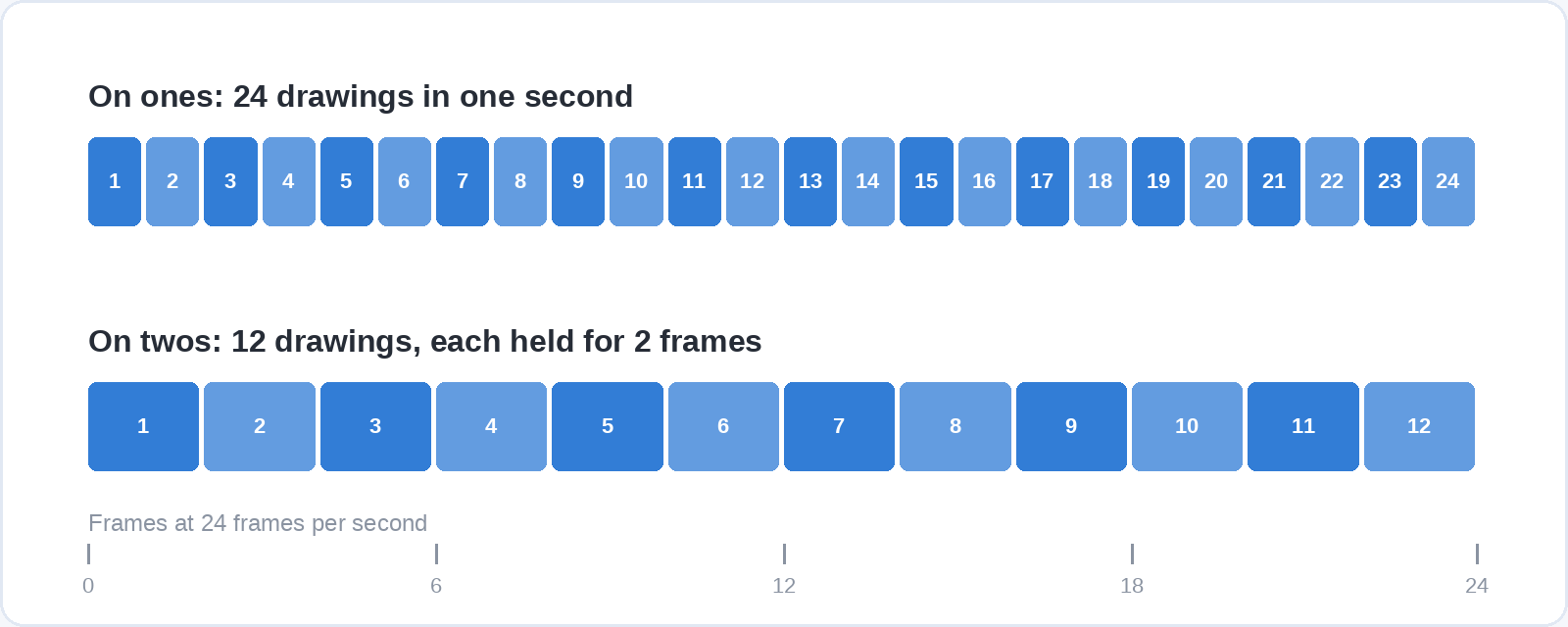
Then test it with a bouncing ball, a classic first exercise in animation teaching. Animate a ball dropping to the floor and bouncing to a stop in about a second. At 24 frames per second, the standard for film, that is 24 frames, and working on twos (holding each drawing for two frames, as much hand-drawn animation does) it is 12 drawings.
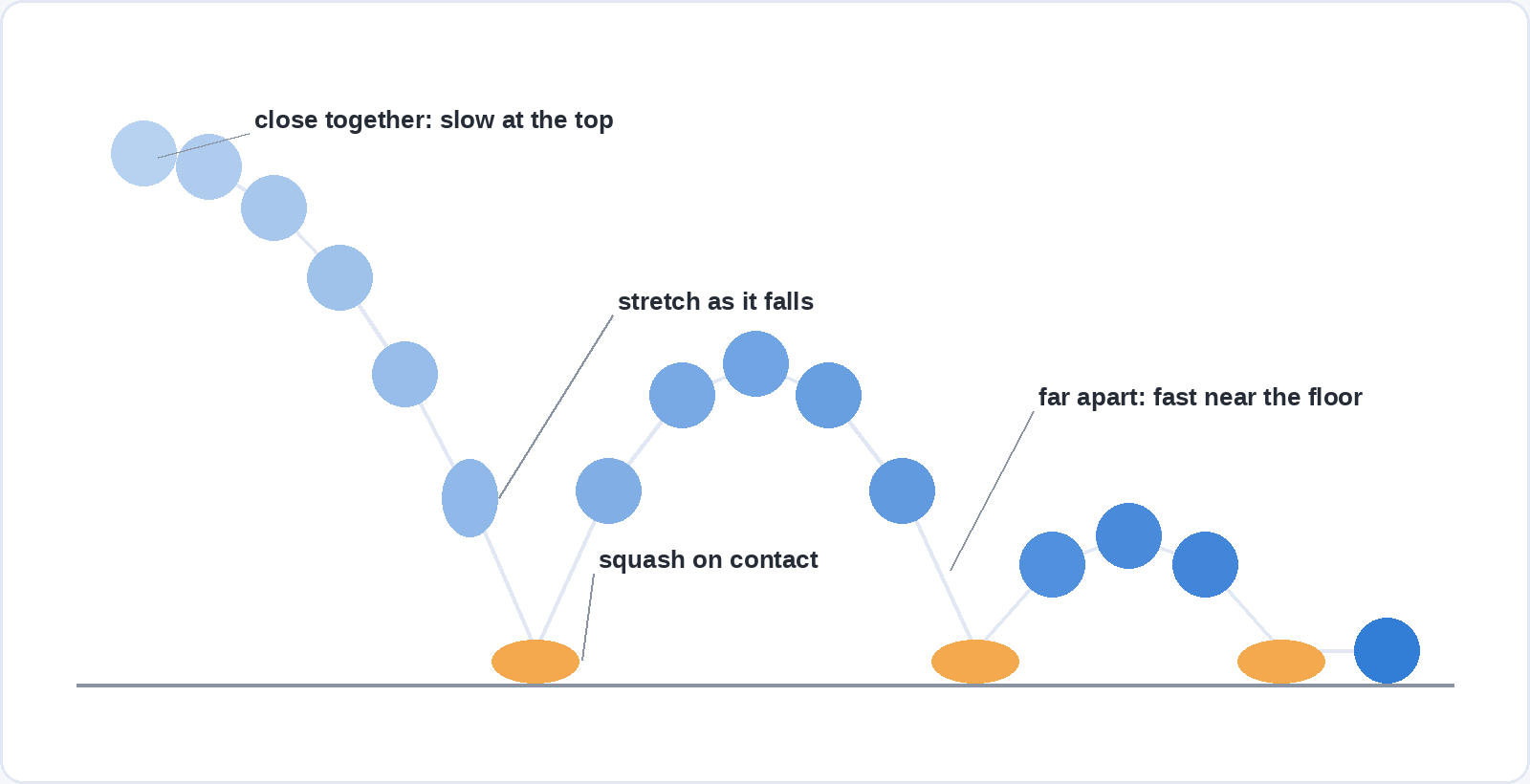
Space the drawings close together at the top of each bounce, where the ball slows, and further apart near the floor, where it moves fastest. Squash the ball flat as it hits the ground and stretch it slightly as it falls, which is the squash and stretch principle described by the Disney animators Frank Thomas and Ollie Johnston in The Illusion of Life (1981).
If an evening with the bouncing ball leaves you wanting to animate something else, the tool suits you. If you spent it hunting through menus, try the next program in the same family before drawing any conclusions about animation itself. For drawn animation, the drawing matters more than the software, and our guide to learning to draw as an adult sets out seven exercises that train the eye.
Questions people ask about animation software
What is the best free animation software?
Blender for 3D, Krita for frame-by-frame 2D and Cavalry for motion graphics. All three are free to download, and Cavalry’s free tier covers commercial work by individuals. OpenToonz and Synfig are the free choices for studio-style 2D and rigged 2D.
Is Blender good for 2D animation?
Yes. Its Grease Pencil system draws and animates frame by frame inside a 3D scene. Because Blender’s interface is built around 3D, people who only want 2D often find Krita or OpenToonz quicker to learn.
What software do animation studios use?
For 2D, Toon Boom Harmony is built for studio production, and Studio Ghibli worked in Toonz, the program OpenToonz comes from. For 3D, Flow showed that Blender can carry a feature film, and larger studios also use paid packages such as Autodesk Maya.
Can I animate on an iPad?
Yes. Procreate Dreams costs $12.99 in the US as a one-off purchase and supports frame-by-frame drawing, keyframes and performance recording on any iPad running iPadOS 16.3 or later.
Do I need a drawing tablet to animate?
For frame-by-frame drawing, in practice yes: a pressure-sensitive pen tablet, or an iPad with a stylus, makes drawing dozens of frames manageable. For rigged 2D, motion graphics, 3D and template tools, a mouse is enough.
Is Adobe Animate being discontinued?
No. Adobe withdrew its February 2026 discontinuation plan and put Animate into maintenance mode, so it still receives security and bug fixes but no new features.
Where to go from here
Animation rests on drawing, design and timing, and you can build the first two before you spend anything on software. Soofos has 40+ free online courses, including painting and Photoshop, that you can start today with a free account.