
Most advice about using your phone less aims at the wrong number. You can cut an hour off your screen time and still unlock the phone eighty times a day, and it is the unlocking that breaks an afternoon of work into pieces. The eight methods below are sorted by which of those two numbers each one moves, and by how much evidence there is that it moves anything at all.
That second part matters more than the tip lists let on. The study behind “put your phone in another room” failed a direct replication. The advice everyone gives about notifications, switch them all off, came out worse than changing nothing in the one trial that tested it against the alternatives. Two methods have solid measurements behind them, three are sensible mechanics with thin evidence, and one is worth doing for a completely different reason than the one you have read.
The two numbers your phone already counts
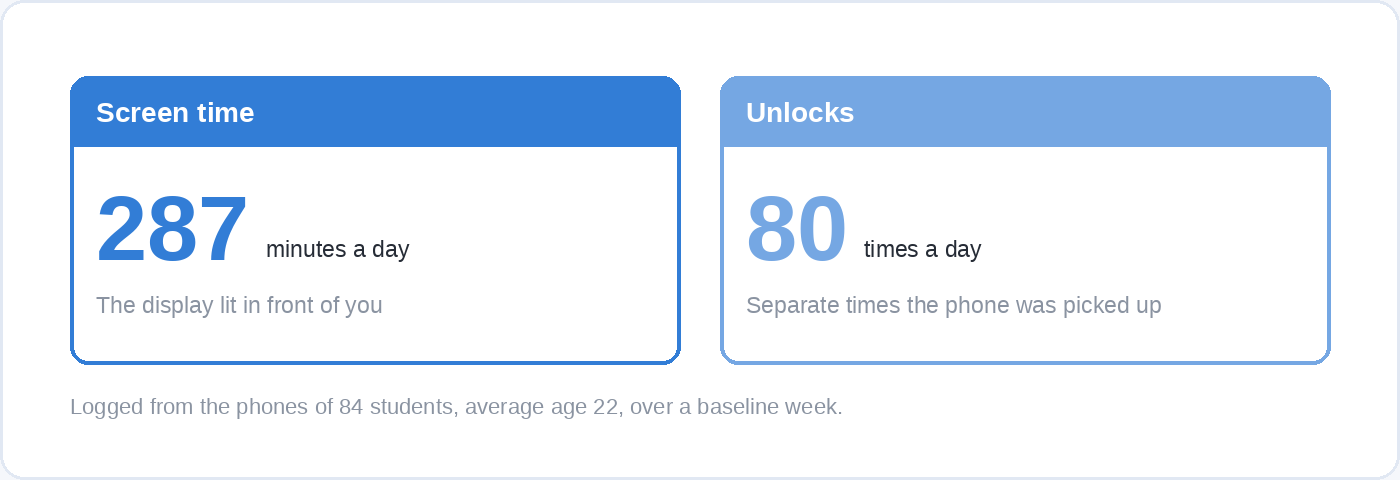
Your phone produces two separate measurements and they respond to different fixes. Screen time is how long the display was lit in front of you. Unlocks, or pickups, is how many separate times you reached for it.
In a two-week study that logged the phones of 84 students with an average age of 22, those numbers were about 287 minutes of screen time a day and about 80 unlocks a day. The gap between them is the whole problem. If you are reading something that takes concentration, most of what a glance costs is paid after it, in the time it takes to find your place in the argument again, and you pay that eighty times over whether the glances add up to four hours or two.
So the useful question about any method is which of those two numbers it moves, and that is the order the eight below are written in.
1. Measure your unlocks for a week before you change a setting
Spend a week reading the number you have probably never looked at, which is how many times a day you unlock the phone and what you open first.
Android reports it directly. Digital Wellbeing shows what apps were on screen and for how long, how often you unlocked the device and opened particular apps, and how many notifications you received and from which apps. On iPhone, Screen Time reports how the device is used and lets you set daily time allowances by app category and schedules that control which apps are available at which times of day.
You are not looking for the total. You are looking for the two or three apps that absorb the unlocks and the two or three moments of the day that produce them, because those are the only things the rest of this list can act on. A week is enough to see the pattern and short enough that you will actually do it.
2. Distance works, for a duller reason than you have read
Moving the phone out of reach is worth doing, and the famous reason for doing it does not hold up.
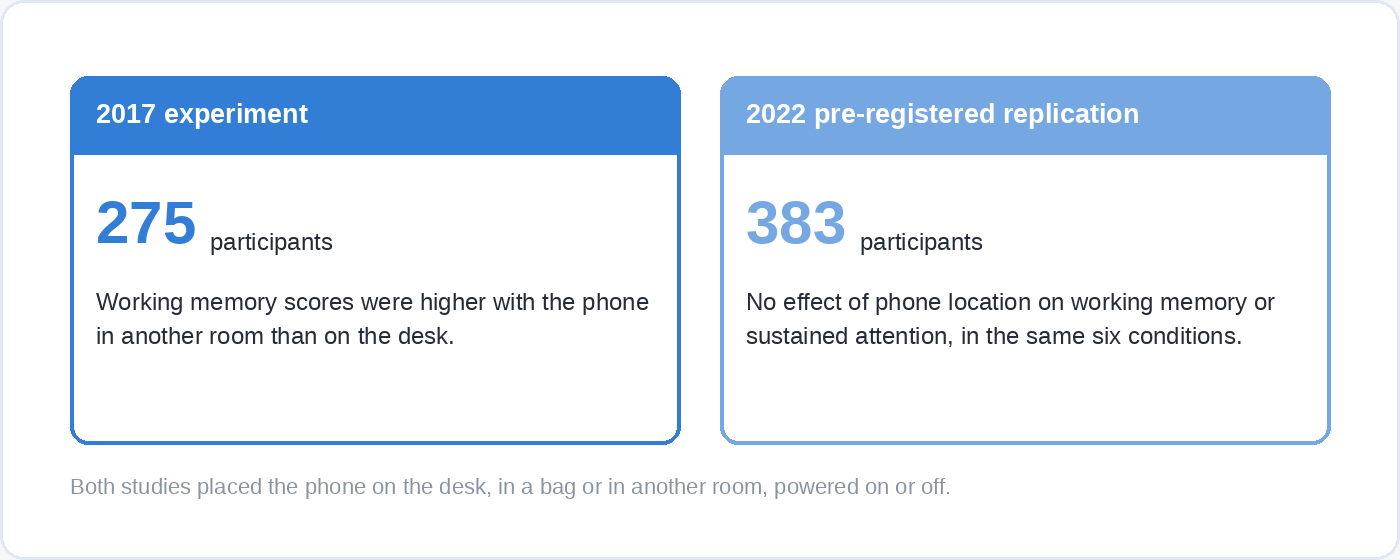
The 2017 experiment that made the argument popular put 275 participants through a working memory task with their phone on the desk, in a bag or in another room, and found that scores were higher when the phone was furthest away. It was written up everywhere as evidence that a phone drains your thinking even when you ignore it. In 2022 a pre-registered direct replication ran the same design with 383 undergraduates across the same six conditions and found nothing: no effect of phone location on the working memory task, none on a sustained-attention task, and no moderation by how attached to their phones people said they were.
The mechanical reason survives that. A phone in a drawer in another room costs you standing up, and a reach that costs standing up gets skipped. That is roughly what the one randomised test of a full package found: 70 participants who adopted ten changes, including leaving the phone at home when it was not needed, turning off face unlock and switching the display to greyscale, ended up with lower screen time than a control group who only tracked theirs.
3. Batch your notifications, and do not switch them all off
Turning every notification off is the standard recommendation, and it is the one change on this list that a trial found made things worse.
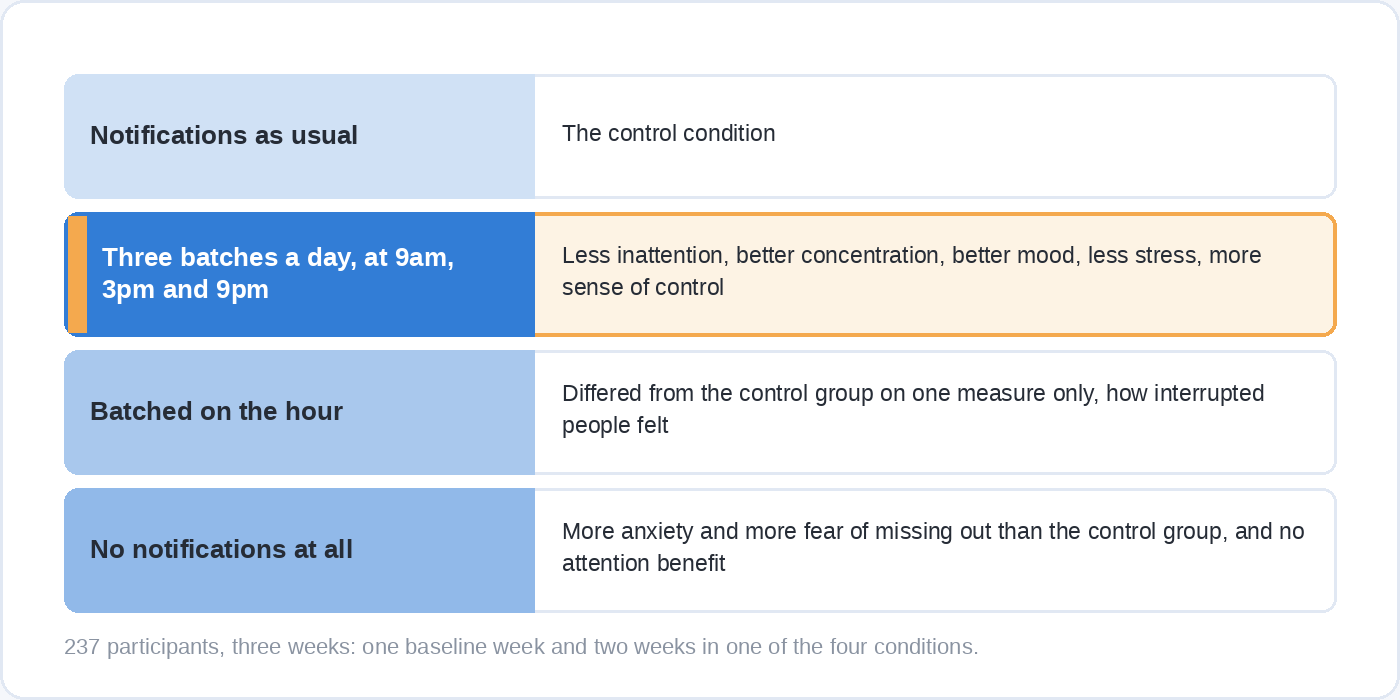
In a three-week study, 237 participants recruited in India spent one week with their normal notifications and then two weeks in one of four conditions: notifications as usual, batched three times a day at 9am, 3pm and 9pm, batched on the hour, or switched off entirely. The three-times-a-day group reported lower inattention, better concentration, better mood, less stress and more sense of being in control of their phone than the control group. Hourly batching was almost indistinguishable from normal notifications, differing on one measure only, how interrupted people felt. The group with no notifications at all reported more anxiety and more fear of missing out than the control group, and got none of the attention benefit.
That result is easy to believe once you have tried it. A silent phone does not stop you wondering what is on it, so you check it more deliberately and more often. A phone that delivers three times a day answers the question on a schedule, which is what actually lets you leave it alone in between.
In practice that means keeping a short list of people and apps that reach you the moment they want to, and putting everything else on a timetable. A Focus on iPhone lets you choose which notifications come through and silences the rest, and Focus mode on Android pauses the apps you name until you switch it off.
4. Take the apps you lose time in off the first screen
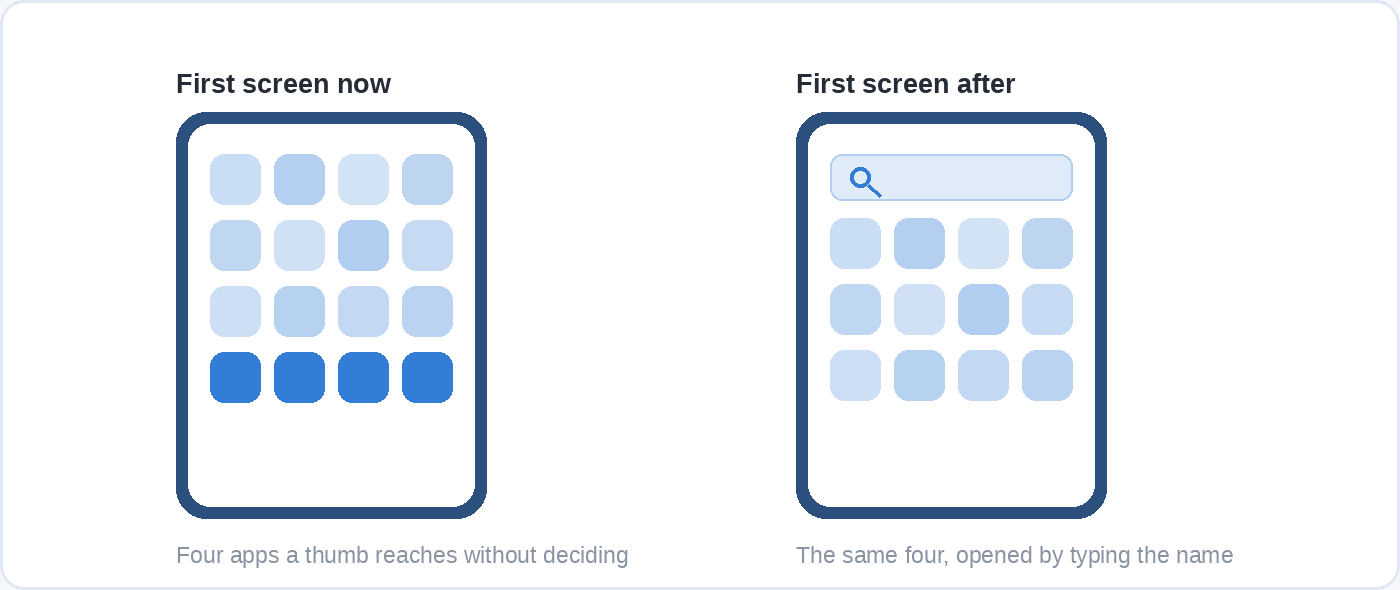
The apps that take your hours are the ones your thumb can reach without making a decision, so the cheapest change available is to make them cost a decision.
Move the two or three apps your week’s measurement identified off the home screen entirely, so opening them means typing part of the name into search. Turning off face or fingerprint unlock does the same job one layer down: it puts a deliberate act between reaching for the phone and being inside it, which is why that change was in the package the randomised test used.
This is friction rather than blocking, and the difference matters. A review of 367 digital self-control tools, 86 from Google Play, 58 from the App Store and 223 from the Chrome Web Store, found that 74 per cent of them worked by blocking or removing something, with 50 tools adding friction rather than a hard block. What almost none of them did was help a new habit form: only 18 per cent supported anything the authors counted as habit scaffolding. A blocker buys you an afternoon. A home screen with nothing tempting on it changes what your hand does when it is bored.
5. Greyscale shortens the visit and does nothing to the reach
Greyscale is the most-recommended setting change on the internet, and the study that measured it properly found it does about half of what people hope.
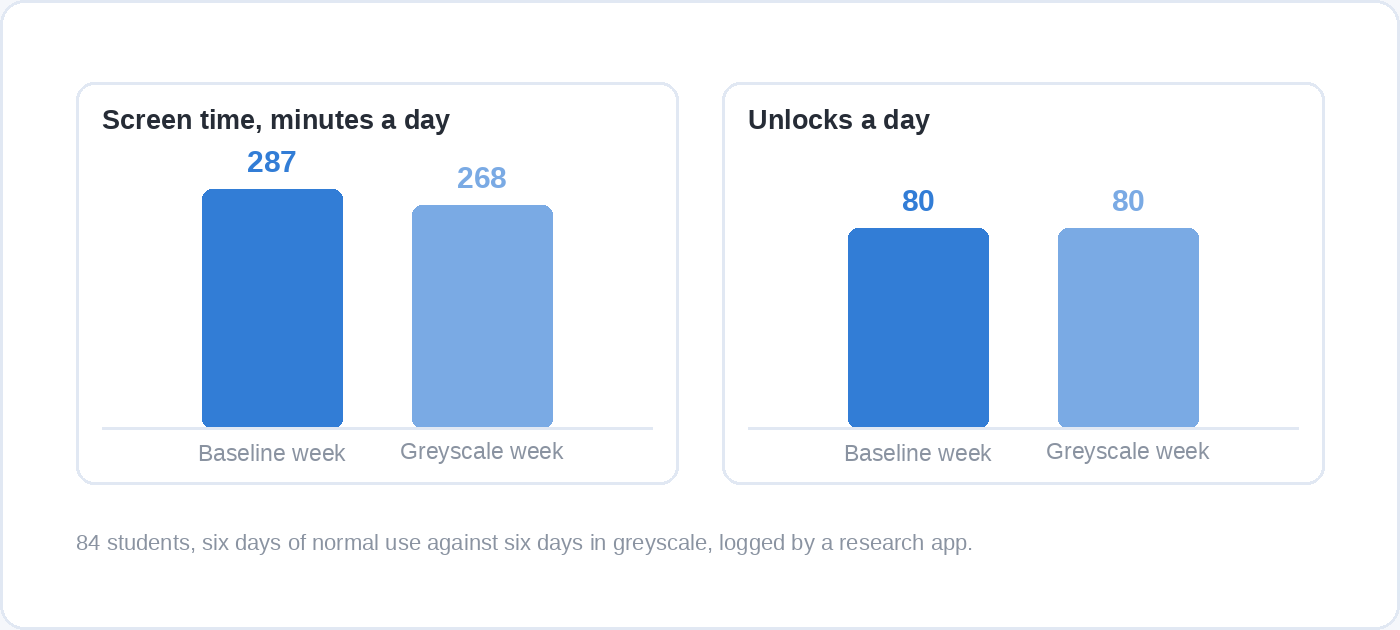
Researchers logged the phones of 84 students for six days as normal and six days with the display in greyscale. Screen time fell from roughly 287 minutes a day to roughly 268, a drop of about 20 minutes and a medium-sized effect. Unlocks did not move at all: about 80 a day in both weeks, with an effect size indistinguishable from zero.
Read the two results together and greyscale is doing something specific and limited. It makes the phone less rewarding once you are looking at it, so sessions end sooner. It does not make you reach for it less, because the reach happens before you see any colour, so switch it on to shorten sessions and expect the unlock count to stay roughly where it is.
6. Give the phone a place to be
A phone with a parking spot gets put down. A phone with nowhere to go stays in a hand or a pocket, which means it stays within reach of every idle moment.
Pick one place, out of the room you work in if you can manage it, and put a charger there. The spot does more work than any rule about hours, because it replaces a decision you would otherwise take dozens of times a day with an arrangement you made once. The same applies to meals and to the first hour of the morning: the phone is somewhere else by default, and bringing it to you is the thing that takes effort.
This one has no trial of its own. It is the practical form of the distance finding in method two, and it costs nothing to test for a fortnight against your own unlock count.
7. Decide in advance what goes in the gap
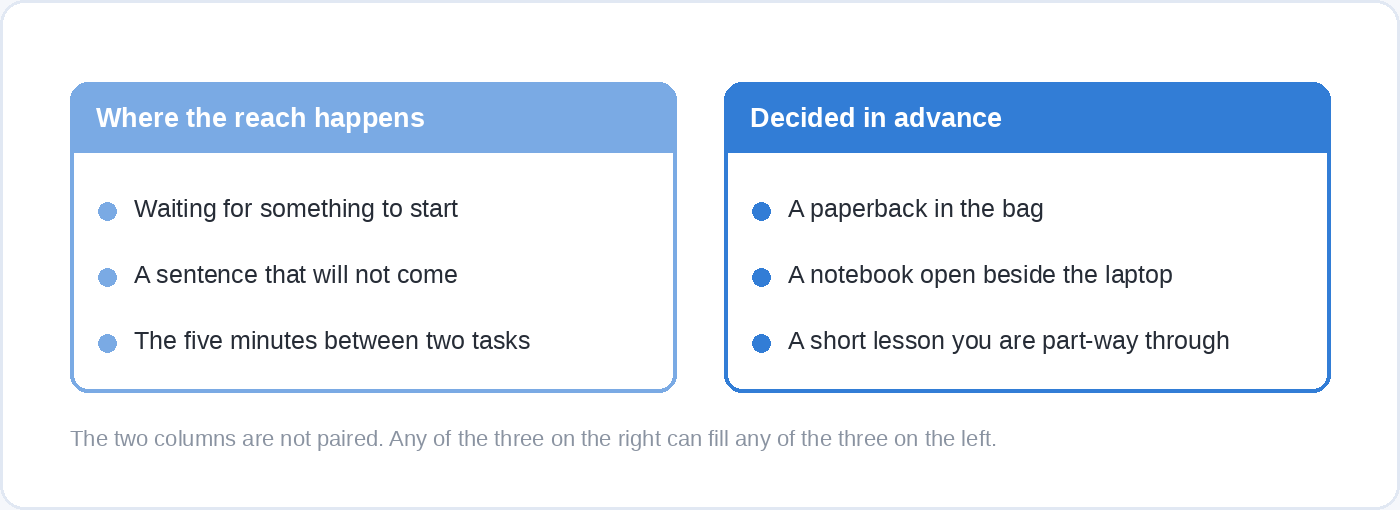
Every reach is for something. A wait, a stuck sentence, five dull minutes between two meetings, the moment a piece of work gets hard. Remove the phone from those gaps without deciding what replaces it and the gaps simply get uncomfortable, and an uncomfortable gap is what ends most attempts.
Pick the replacement before you need it and keep it as close to hand as the phone was. A paperback in the bag. A notebook open beside the laptop. A short lesson you are part-way through, which suits these gaps better than it suits an evening: separating study into short sessions with time in between is one of the few learning habits with strong evidence behind it, as our piece on how to learn easier sets out in more detail. Ten minutes in a queue is closer to the spacing that research recommends than the same time added to an evening block.
If you want something to put there that does not cost anything, the free courses on Soofos run short enough to fit a genuine gap.
8. Set the limit where you cannot dismiss it with one tap
A daily limit you can wave away with a tap is a reminder rather than a limit, and it lasts exactly as long as you feel like honouring it.
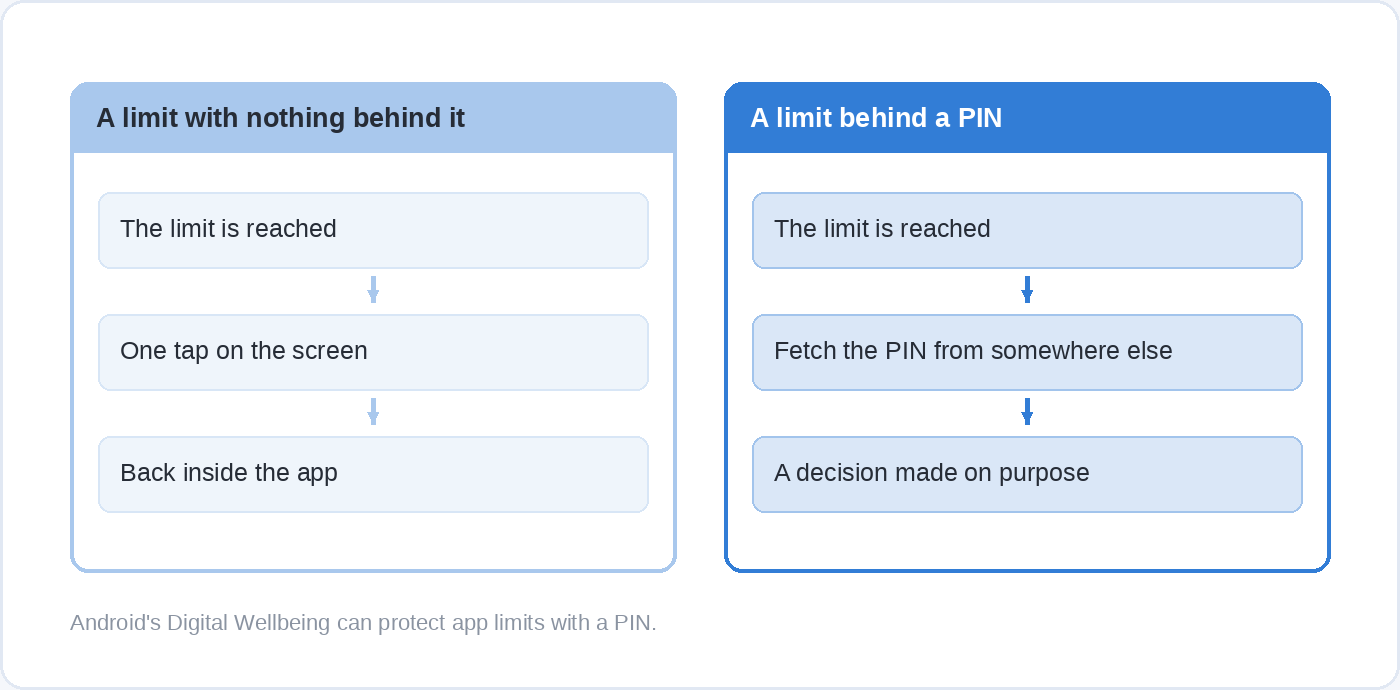
Both platforms have the mechanism. Android’s Digital Wellbeing offers app timers, a bedtime mode that can switch the screen to greyscale and dim it, focus mode for pausing chosen apps, and the part most people never find, a PIN that protects the limits so turning them off takes a deliberate act. On iPhone, Screen Time sets daily time allowances by app category and schedules that decide which apps are available at which times.
The principle is the same whichever phone you hold: make undoing the limit slower than the urge that wants it undone. A PIN written on paper in another room works. So does a housemate who holds it. So does deleting the app on Sunday night and reinstalling it on Friday, which sounds extreme until you compare it with how long you have already spent trying to use willpower on a system designed by people who measure the results.
What each method actually changes
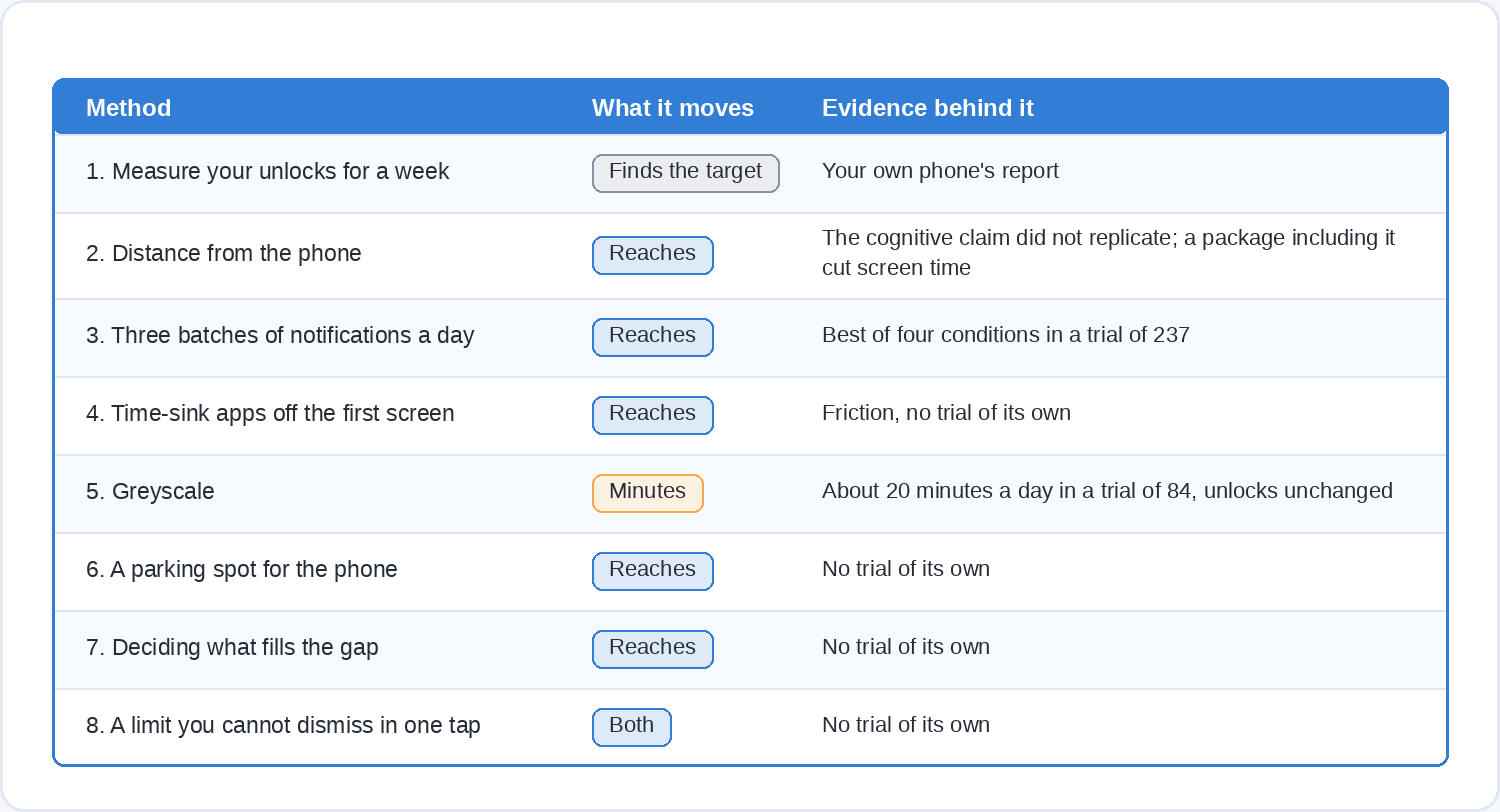
Sorted by which number moves, the list is short and slightly deflating. Two methods have direct measurements behind them: batching notifications, which changed how interrupted and how attentive people felt, and greyscale, which took about 20 minutes a day off screen time and left the reaching untouched. Three are mechanics with good reasoning and thin evidence: distance, friction on the home screen, and the parking spot. Two are about the person rather than the phone: measuring first, and deciding what fills the gap. One popular method, silencing everything, has a trial saying it goes backwards.
If you do only two things, batch your notifications to three times a day and measure your unlocks for the fortnight afterwards. Those two together will tell you more about your own phone than any list can, including this one.
Questions people ask
How many hours a day on your phone is too much?
No trial has produced a threshold, and any number you see quoted as one was chosen rather than found. The useful question is what the phone is displacing. Four hours of screen time in the evening after the work is done is a different fact about your life than two hours taken eighty pieces at a time out of the middle of it.
Does greyscale really reduce screen time?
Yes, by about 20 minutes a day in the study that logged it, comparing six days of normal use with six days of greyscale among 84 students. It had no measurable effect on how often those students unlocked their phones, which stayed at about 80 times a day in both weeks.
Should I turn off all my notifications?
Probably not. In the trial that compared switching them all off against batching them, the group with no notifications reported more anxiety and more fear of missing out than the group with normal notifications, and got none of the attention benefit. Three scheduled batches a day did best of the four conditions tested.
Does keeping your phone in another room make you think more clearly?
The 2017 experiment that found this effect had 275 participants. A pre-registered direct replication with 383 participants found no difference in working memory or sustained attention between having the phone on the desk, in a bag or in another room. Keeping it out of reach is still worth doing for the plainer reason that a reach costing you a walk to another room gets skipped, which is a smaller claim and one you can test on your own unlock count.
Do app blockers work?
They buy time rather than change habits. Of 367 self-control tools reviewed across three app stores, 74 per cent worked by blocking or removing access, and only 18 per cent did anything to support the new behaviour that is meant to take the old one’s place. A blocker is most useful for a specific fortnight with a specific goal, not as a permanent arrangement.
How long does it take before the change sticks?
Longer than a weekend, shorter than the folklore suggests. In the randomised test of the ten-change package, the improvement in participants’ phone use was still there at least six weeks after the brief intervention ended. That is one small study, so treat six weeks as a sign that this is learnable rather than as a deadline.
Where the hours go instead
Cutting unlocks is only half a plan. The other half is having something worth the attention you just got back, and that turns out to be the harder half for most people.
If you want a structured way to work on it, Soofos’s Advanced Time Management Strategies for Top-1% Productivity covers prioritisation, time blocking and timeboxing across 82 lessons, with a chapter on focus and attention that goes into distraction and the apps built to hold it. The first lesson plays in full without an account, so you can hear how it is taught before you decide.